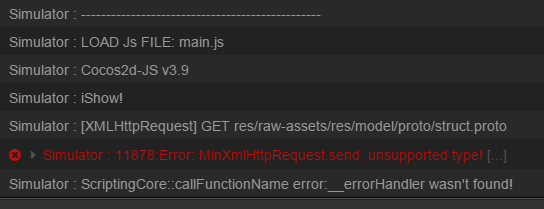
补充一下,我用的加载方式是 protobuf.js中的
/**
* Fetches a resource.
* @param {string} path Resource path
* @param {function(?string)=} callback Callback receiving the resource’s contents. If omitted the resource will
* be fetched synchronously. If the request failed, contents will be null.
* @return {?string|undefined} Resource contents if callback is omitted (null if the request failed), else undefined.
* @expose
*/
> Util.fetch = function(path, callback) {
            if (callback && typeof callback != 'function')
                callback = null;
            if (Util.IS_NODE) {
                var fs = require("fs");
                if (callback) {
                    fs.readFile(path, function(err, data) {
                        if (err)
                            callback(null);
                        else
                            callback(""+data);
                    });
                } else
                    try {
                        return fs.readFileSync(path);
                    } catch (e) {
                        return null;
                    }
            } else {
                var xhr = Util.XHR();
                xhr.open('GET', path, callback ? true : false);
                // xhr.setRequestHeader('User-Agent', 'XMLHTTP/1.0');
                xhr.setRequestHeader('Accept', 'text/plain');
                if (typeof xhr.overrideMimeType === 'function') xhr.overrideMimeType('text/plain');
                if (callback) {
                    xhr.onreadystatechange = function() {
                        if (xhr.readyState != 4) return;
                        if (/* remote */ xhr.status == 200 || /* local */ (xhr.status == 0 && typeof xhr.responseText === 'string'))
                            callback(xhr.responseText);
                        else
                            callback(null);
                    };
                    if (xhr.readyState == 4)
                        return;
                    xhr.send(null);
                } else {
                    xhr.send(null);
                    if (/* remote */ xhr.status == 200 || /* local */ (xhr.status == 0 && typeof xhr.responseText === 'string'))
                        return xhr.responseText;
                    return null;
                }
            }
        };