1.7 场景属性中的 autoReleaseAssets 属性是去掉了吗?
发现没有了,提交版本库时发现这个属性变成null了。。。

1.7 场景属性中的 autoReleaseAssets 属性是去掉了吗?
发现没有了,提交版本库时发现这个属性变成null了。。。
1.7 b5 mac
新建工程,然后在工程里放入ttf字体,然后就会卡死,并报错
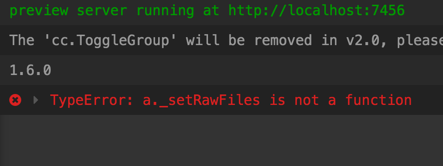
这是日志
2017-11-03T08:08:51.340Z - normal: Loading packages
2017-11-03T08:08:51.343Z - normal: Watching packages
2017-11-03T08:08:51.350Z - normal: Run Application
2017-11-03T08:08:51.473Z - warn: [db-task][init] Backup unused meta file: db://assets/Texture/ui.meta
2017-11-03T08:08:53.690Z - success: preview server running at http://localhost:7456
2017-11-03T08:08:54.564Z - normal: The ‘cc.ToggleGroup’ will be removed in v2.0, please use ‘cc.ToggleContainer’ instead. 
2017-11-03T08:08:56.386Z - normal: 1.6.0
2017-11-03T08:09:29.097Z - error: TypeError: a._setRawFiles is not a function
at /Applications/CocosCreator.app/Contents/Resources/app.asar/editor/share/assets/meta/ttf-font.js:1:768
at /Applications/CocosCreator.app/Contents/Resources/app.asar/node_modules/graceful-fs/graceful-fs.js:78:16
at FSReqWrap.readFileAfterClose [as oncomplete] (fs.js:439:3)
at process.on.t (/Applications/CocosCreator.app/Contents/Resources/app.asar/editor/core/editor-init.js:1:1068)
at emitOne (events.js:101:20)
at process.emit (events.js:191:7)
at process._fatalException (bootstrap_node.js:308:26)
之前我也没理清楚,刚跟@jare确认了一下。
v1.7-release用于发布当前v1.7.x的版本,所有当前版本的补丁会提交到这个分支。
v1.7分支用于下个版本v1.7.(x+1)的开发版本,v1.7分支会隔段时间去merge一次v1.7-release
比如当前在做 1.7.1的发布,然后能进入当前版本(1.7.1)的补丁代码,发布PR到v1.7-release
需要进入到1.7.2的代码,发布PR到v1.7
一脸懵逼,今天合并的 PR,才会报这个警告,为毛你的会报这个警告,你的 engine 是内置的还是自己下载的?
了解了
可能是合并错分支了。。。
似乎 creator 跟分支不太配套。。
creator1.7beta5版本gl.createBuffer(),gl.bindBuffer(),cc.GlNode等opengl相关的接口都没了,在正式版会加回来吗?还是不加了,要自己来绑定?
希望能更新一下CocosCreator 带的 cocos2d-console 版本, 新版的 XCode 已经没有 PackageApplication 了.
warning: PackageApplication is deprecated, use xcodebuild -exportArchive instead.
这个警告会导致什么问题么?
           // 看这行代码,如果xcode 》=8.3应该是用exportArchive的。
            use_new_ipa_method = cocos.version_compare(xcode_version,">=",8.3)

            if self._sign_id is not None:
                if use_new_ipa_method:
                    archive_path = os.path.join(output_dir, "%s.xcarchive" % targetName)
                    command = "%s CODE_SIGN_IDENTITY=\"%s\" -archivePath %s archive" % (command, self._sign_id, archive_path)
                else:
                    command = "%s CODE_SIGN_IDENTITY=\"%s\"" % (command, self._sign_id)

            command = self.append_xcpretty_if_installed(command)
            self._run_cmd(command)

            filelist = os.listdir(output_dir)
            for filename in filelist:
                name, extention = os.path.splitext(filename)
                if extention == '.a':
                    filename = os.path.join(output_dir, filename)
                    os.remove(filename)

            self._iosapp_path = os.path.join(output_dir, "%s.app" % targetName)
            if self._no_res:
                self._remove_res(self._iosapp_path)

            if self._sign_id is not None:
                # generate the ipa
                ipa_path = os.path.join(output_dir, "%s.ipa" % targetName)
                if use_new_ipa_method:
                    # generate exportoptions.plist file if needed
                    export_options_plist_path = os.path.join(output_dir, "exportoptions.plist")
                    self._generate_export_options_plist(export_options_plist_path)

                    archive_path = os.path.join(output_dir, "%s.xcarchive" % targetName)
                    ipa_cmd = "xcodebuild -exportArchive -archivePath %s -exportPath %s -exportOptionsPlist %s" % (archive_path, output_dir, export_options_plist_path)
                    self._run_cmd(ipa_cmd)
                else:
                    ipa_cmd = "xcrun -sdk %s PackageApplication -v \"%s\" -o \"%s\"" % (self.use_sdk, self._iosapp_path, ipa_path)
                    self._run_cmd(ipa_cmd)
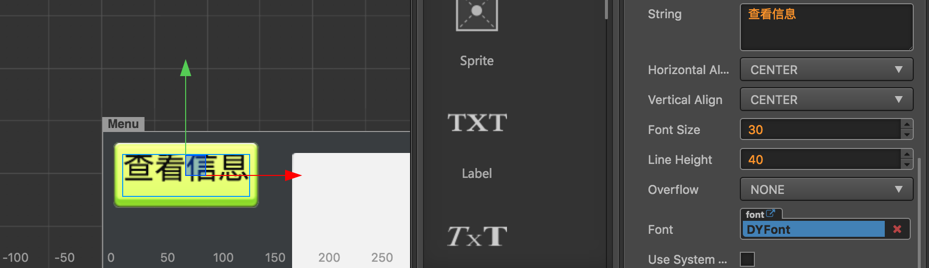
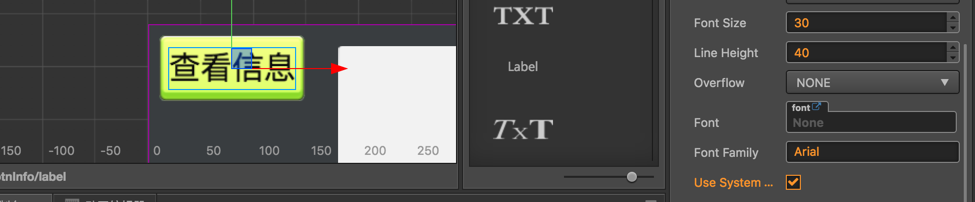
使用TTF字体顶部被截断, 用过的这几个版本,都有这个问题(1.6.x, 1.7.x), 如图:
使用系统字体就是好的
求解~
这个好像是特定 ttf 才会出现的,你可以对比一下官方范例中的 example-case 里面的 ttf
后续会看看,能否麻烦给一下有问题的 ttf 资源?
请教一下,在Log里大量出现的这个
(省略N列)
Simulator: spTrackEntry 0x7fa168510ca0 was recycled!
Simulator: spTrackEntry 0x7fa16e7858c0 was recycled!
Simulator: spTrackEntry 0x7fa16e7094b0 was recycled!
Simulator: spTrackEntry 0x7fa168508e80 was recycled!
Simulator: spTrackEntry 0x7fa16e784bb0 was recycled!
Simulator: spTrackEntry 0x7fa168513ee0 was recycled!
Simulator: spTrackEntry 0x7fa1684f7a20 was recycled!
Simulator: spTrackEntry 0x7fa16e785790 was recycled!
Simulator: ScriptEngine::cleanup begin ...
Simulator: GC begin ..., (Native -> JS map) count: 1589
Simulator: GC end ..., (Native -> JS map) count: 1306
Simulator: GC begin ..., (Native -> JS map) count: 1306
Simulator: GC end ..., (Native -> JS map) count: 1306
Simulator: GC begin ..., (Native -> JS map) count: 1306
Simulator: GC end ..., (Native -> JS map) count: 1306
Simulator: jsbindings: finalizing JS object 0x7fa168437580 (spTrackEntry)
Simulator: jsbindings: finalizing JS object 0x7fa16e55f620 (spTrackEntry)
Simulator: jsbindings: finalizing JS object 0x7fa169119d50 (spTrackEntry)
Simulator: jsbindings: finalizing JS object 0x7fa169119df0 (spTrackEntry)
Simulator: jsbindings: finalizing JS object 0x7fa169119ee0 (spTrackEntry)
Simulator: jsbindings: finalizing JS object 0x7fa16e550f10 (spTrackEntry)
Simulator: jsbindings: finalizing JS object 0x7fa16e551000 (spTrackEntry)
Simulator: jsbindings: finalizing JS object 0x7fa16e560ab0 (spTrackEntry)
Simulator: jsbindings: finalizing JS object 0x7fa16e560ba0 (spTrackEntry)
Simulator: jsbindings: finalizing JS object 0x7fa16e568e60 (spTrackEntry)
Simulator: jsbindings: finalizing JS object 0x7fa16e568fa0 (spTrackEntry)
Simulator: jsbindings: finalizing JS object 0x7fa1686a7950 (spTrackEntry)
Simulator: jsbindings: finalizing JS object 0x7fa1686c1f80 (spTrackEntry)
Simulator: jsbindings: finalizing JS object 0x7fa1686c2020 (spTrackEntry)
Simulator: jsbindings: finalizing JS object 0x7fa1686046b0 (spTrackEntry)
Simulator: jsbindings: finalizing JS object 0x7fa168604750 (spTrackEntry)
Simulator: jsbindings: finalizing JS object 0x7fa1700175b0 (spTrackEntry)
Simulator: jsbindings: finalizing JS object 0x7fa170017650 (spTrackEntry)
(省略N行)
请问这些log是异常吗?
场景有用很多Spine动画,但是这个log把想看到的东西都盖掉了
现在都是跳一个版本进行发布了么?
android studio 必须3.0 ,那之前的2.xx是卸载还是直接装?
不是异常。GC那个留着吧,可以容易发现内存泄露问题。其他的可以去掉。