
let act = tween(this.NodeBolick).to(0.2, { scale: new Vec3(1, 1, 1) }).start()
act.stop();
1赞
    SetTouch() {
        this.node.on('touch-start', (event) => {
            if (this.GameType != 1) return
            log('手指按下')
            let BoxShrink = tween(this.NodeBolick).to(2, { scale: new Vec3(0.9, 0.9, 0.9) }).start()
            BoxShrink.stop()
            log("缩放")
        }, this);
        this.node.on('touch-move', (event) => {
            if (this.GameType != 1) return
            log('手指移动')
        }, this);
        this.node.on('touch-end', (event) => {
            if (this.GameType != 1) return
            log('手指抬起')
            let BoxAmplification = tween(this.NodeBolick).to(0.2, { scale: new Vec3(1, 1, 1) }).start()
            BoxAmplification.stop()
            log("放大")
        }, this);
    }
这样写就一动不动了,它直接停止了缓动
Tween.stopAllByTarget(BoxShrink) 你改成这样
1赞
我找到问题的地方了,我长按直到动画完成再松开它就是正常的,但是我如果点击,它就出现问题了
需要停止动画 你这个点击会造成多个动画同时执行
1赞
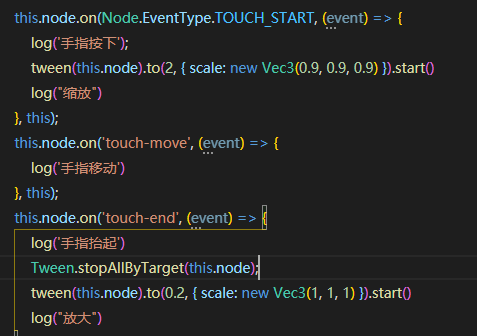 这个效果你试试
1赞
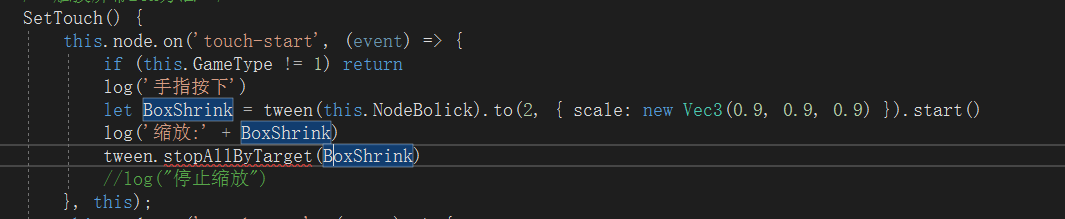
大写 Tween

停止函数要写在end里面,在执行放大动画的前一行
要引入啊…
大佬我给你个连接你在浏览器打开就可以远程编辑你能不能帮忙修改我看看:
https://prod.liveshare.vsengsaas.visualstudio.com/join?43701ACAB77337F9109E8FCC0F1A0A69DAE2
打不开

import { _decorator, Tween } from ‘cc’;
1赞
?右下有一个弹窗选择匿名或者登录
这~
可能是网络问题
https://prod.liveshare.vsengsaas.visualstudio.com/join?43701ACAB77337F9109E8FCC0F1A0A69DAE2
@babyfaction @1224631767 @ai_62po0
感谢三位大佬的帮助,我解决了:
    SetTouch() {
        this.node.on('touch-start', (event) => {
            if (this.GameType != 1) return
            log('手指按下')
           tween(this.NodeBolick).to(2, { scale: new Vec3(0.9, 0.9, 0.9) }).start()
        }, this);
        this.node.on('touch-move', (event) => {
            if (this.GameType != 1) return
            log('手指移动')
        }, this);
        this.node.on('touch-end', (event) => {
            if (this.GameType != 1) return
            log('手指抬起')
            Tween.stopAllByTarget(this.NodeBolick)
           tween(this.NodeBolick).to(0.2, { scale: new Vec3(1, 1, 1) }).start()
        }, this);
    }
面向论坛编程。
该主题在最后一个回复创建后14天后自动关闭。不再允许新的回复。