
版本 3.6.0
2.x 能正常显示
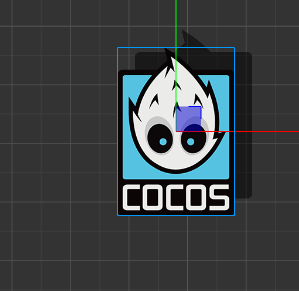
3.x 不能正常显示
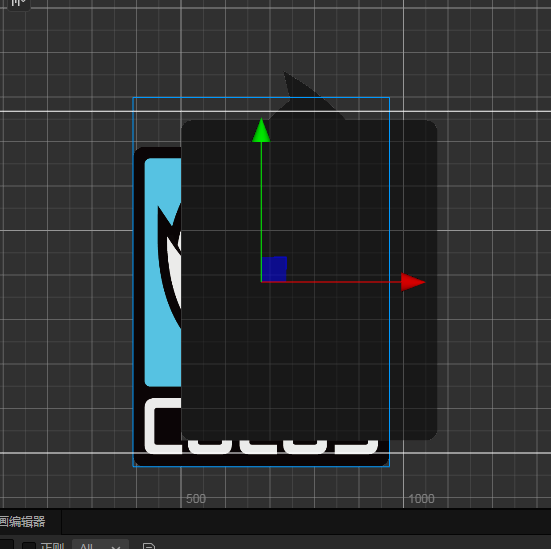
好歹分享下怎么画的吧
// Effect Syntax Guide: 着色器 · Cocos Creator
CCEffect %{
techniques:
-
passes:
-
name: shadow
vert: shadow-vs:vert
frag: shadow-fs:frag
rasterizerState:
cullMode: none
blendState:
targets:
- blend: true

  blendSrc: src_alpha

  blendDst: one_minus_src_alpha

  blendSrcAlpha: src_alpha

  blendDstAlpha: one_minus_src_alpha
properties: &props
_color: { value: [0, 0, 0, 1], editor: { type: color } } -
name: normal
vert: vs:vert
frag: fs:frag
rasterizerState:
cullMode: none
blendState:
targets:
- blend: true

  blendSrc: src_alpha

  blendDst: one_minus_src_alpha

  blendSrcAlpha: src_alpha

  blendDstAlpha: one_minus_src_alpha
properties: *props
-
}%
CCProgram shadow-vs %{
precision highp float;
#include <builtin/uniforms/cc-global>
#if USE_LOCAL
#include <builtin/uniforms/cc-local>
#endif
#if SAMPLE_FROM_RT
#include <common/common-define>
#endif
in vec3 a_position;
in vec2 a_texCoord;
in vec4 a_color;
out vec4 i_color;
out vec2 i_uv;
vec4 vert () {
vec4 pos = vec4(a_position, 1);

#if USE_LOCAL

  pos = cc_matWorld * pos;

#endif

#if USE_PIXEL_ALIGNMENT

  pos = cc_matView * pos;

  pos.xyz = floor(pos.xyz);

  pos = cc_matProj * pos;

#else

  pos = cc_matViewProj * pos;

#endif

i_uv = a_texCoord;

#if SAMPLE_FROM_RT

  CC_HANDLE_RT_SAMPLE_FLIP(i_uv);

#endif

i_color = a_color;

pos.x += 0.1;

pos.y += 0.1;

return pos;
}
}%
//阴影渲染
CCProgram shadow-fs %{
precision highp float;
#include <builtin/uniforms/cc-global>
#if USE_TEXTURE
#include <builtin/internal/sprite-texture>
#endif
in vec4 i_color;
in vec2 i_uv;
uniform Constant {
vec4 _color;
};
vec4 frag () {
vec4 color = vec4(1.0);

  #if USE_TEXTURE

      color *= texture(cc_spriteTexture, i_uv);

      if(color.w >= 0.5) {

          color.r = 0.0;

          color.g = 0.0;

          color.b = 0.0;

          color.w = 0.5;

      }

  #endif

return color;
}
}%
CCProgram vs %{
precision highp float;
#include <builtin/uniforms/cc-global>
#if USE_LOCAL
#include <builtin/uniforms/cc-local>
#endif
#if SAMPLE_FROM_RT
#include <common/common-define>
#endif
in vec3 a_position;
in vec2 a_texCoord;
in vec4 a_color;
out vec4 i_color;
out vec2 i_uv;
vec4 vert () {
vec4 pos = vec4(a_position, 1);

#if USE_LOCAL

  pos = cc_matWorld * pos;

#endif

#if USE_PIXEL_ALIGNMENT

  pos = cc_matView * pos;

  pos.xyz = floor(pos.xyz);

  pos = cc_matProj * pos;

#else

  pos = cc_matViewProj * pos;

#endif

i_uv = a_texCoord;

#if SAMPLE_FROM_RT

  CC_HANDLE_RT_SAMPLE_FLIP(i_uv);

#endif

i_color = a_color;

return pos;
}
}%
//阴影渲染
CCProgram fs %{
precision highp float;
#include <builtin/uniforms/cc-global>
#if USE_TEXTURE
#include <builtin/internal/sprite-texture>
#endif
in vec4 i_color;
in vec2 i_uv;
uniform Constant {
vec4 _color;
};
vec4 frag () {
vec4 color = vec4(1.0,1.0,1.0,1.0);

#if USE_TEXTURE

    color = texture(cc_spriteTexture, i_uv);

#endif

return color;
}
}%
有没有尝试把 shadow-vs 中的 pos.z -= 0.01
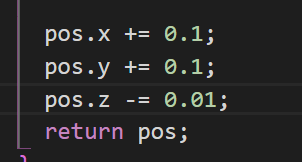 已改 没有效果的
这是3.X的BUG吗
你把工程发一个把,肯定不是 bug,肯定是材质本身的问题,要么 blend 有问题,要么 pass 顺序问题
我用3.5的shader 写过类似的功能 没啥问题
这个问题我们看下

问题已经解决
可能是因为加了那个值,就是相当于一个三维空间了。不是层级的问题了。有个叫深度测试的东西,会把z不一样的渲染到前面或者后面