
感谢分享。我参考了很多你的修改,写入官方版本了 
哇偶,正主来了!可以的,我也不想一直维护,坐等官方版本
对了。有计划吧资源延迟加载集成进去么?
延迟加载迟点再研究了
好的。你只要支持延迟加载和资源卸载,我就可以不维护了

应该是没有安装fairygui的npm包
确实,感谢
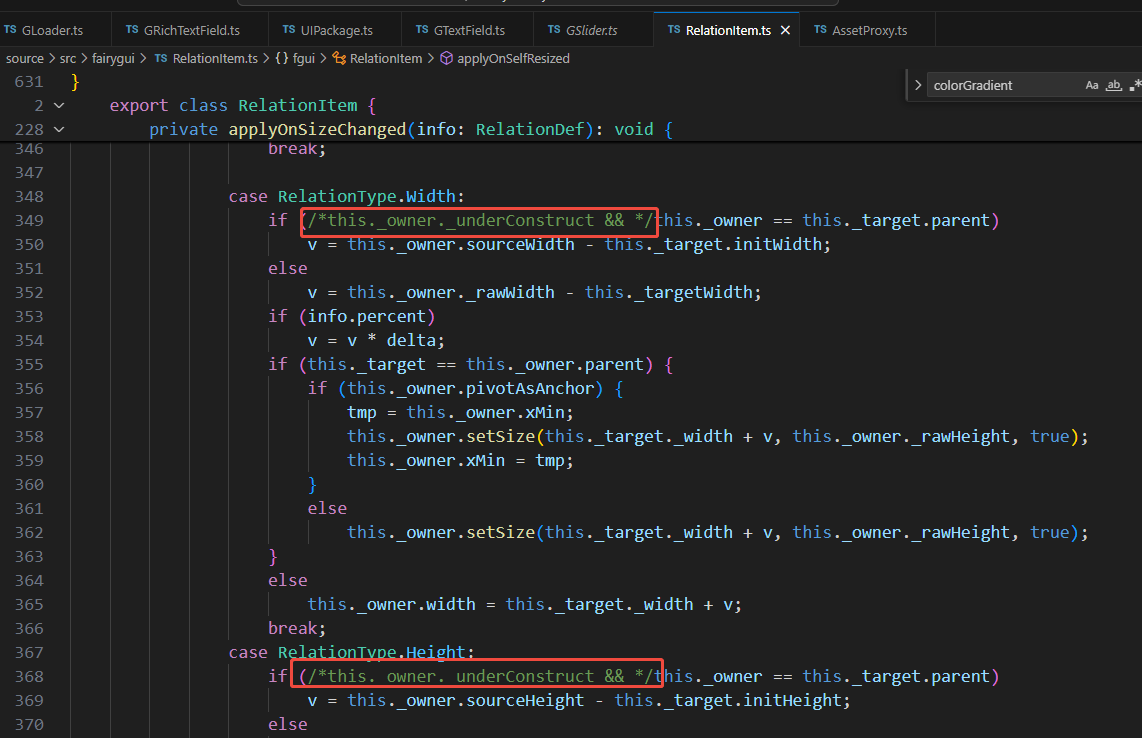
延迟加载,当出现关联宽高时,会导致宽高变得比预期的宽,原因是:
不使用延迟关联判断走第一条分支,但是使用延迟加载,构造流程已经结束了会走到第二条分支,延迟加载资源加载完成后,进入loader url 设置完后,auto 重新设置size
 , 就会进入 relation 中第二个判断流程中,导致结果不符合预期
啊。最近没时间看这个。能提一个pr么?
我这边还在研究下看下怎么解决,目前还没有头绪
fgui富文本的bug, 是多加了LabelOutline组件导致的., 这个 LabelOutline 组件会自动创建Label组件.
试过没。有用吗
试过了,没问题
在GObject 的构造中添加一个类似unity 中editor 模式下,编辑修改基本属性的组件
if (EDITOR) {
        // 编辑器模式下自动添加编辑器组件

        this._node.addComponent(FGUIObjectEditor);

   }

import { _decorator, CCFloat, Color, Component, Vec2 } from 'cc';

import { GObject } from './GObject';

import { EDITOR } from 'cc/env';

const { ccclass, property, executeInEditMode} = _decorator;

@ccclass

@executeInEditMode

export class FGUIObjectEditor extends Component {

    private _gObject: GObject | null = null;

    onLoad() {

        // 通过节点关联获取GObject实例(需根据项目实际绑定方式调整)

        this._gObject = (<any>this.node)['$gobj'] as GObject;

    }


    // 暴露可编辑属性到编辑器检查器

    @property({ visible: EDITOR }) get name(): string { return this._gObject?.name || ''; } set name(value: string) { if (this._gObject) this._gObject.name = value; }

    @property({ visible: EDITOR }) get resourceURL(): string { return this._gObject?.resourceURL || ''; }

    @property({ visible: EDITOR }) get pos(): Vec2 { return this._gObject ? new Vec2(this._gObject.x, this._gObject.y) : new Vec2(); } set pos(value: Vec2) { if (this._gObject) { this._gObject.x = value.x; this._gObject.y = value.y; } }

    @property({ visible: EDITOR }) get size(): Vec2 { return this._gObject ? new Vec2(this._gObject.width, this._gObject.height) : new Vec2(); } set size(value: Vec2) { if (this._gObject) { this._gObject.width = value.x; this._gObject.height = value.y; } }

    @property({ visible: EDITOR }) get scale(): Vec2 { return this._gObject ? new Vec2(this._gObject.scaleX, this._gObject.scaleY) : new Vec2(1, 1); } set scale(value: Vec2) { if (this._gObject) { this._gObject.scaleX = value.x; this._gObject.scaleY = value.y; } }

    @property({ visible: EDITOR }) get pivot(): Vec2 { return this._gObject ? new Vec2(this._gObject.pivotX, this._gObject.pivotY) : new Vec2(); } set pivot(value: Vec2) { if (this._gObject) { this._gObject.pivotX = value.x; this._gObject.pivotY = value.y; } }

    @property({ visible: EDITOR }) get rotation(): number { return this._gObject?.rotation || 0; } set rotation(value: number) { if (this._gObject) this._gObject.rotation = value; }

    @property({ visible: EDITOR }) get visible(): boolean { return this._gObject?.visible || false; } set visible(value: boolean) { if (this._gObject) this._gObject.visible = value; }

    @property({ visible: EDITOR }) get touchable(): boolean { return this._gObject?.touchable || false; } set touchable(value: boolean) { if (this._gObject) this._gObject.touchable = value; }

    @property({ visible: EDITOR }) get grayed(): boolean { return this._gObject?.grayed || false; } set grayed(value: boolean) { if (this._gObject) this._gObject.grayed = value; }

    @property({ visible: EDITOR }) get draggable(): boolean { return this._gObject?.draggable || false; } set draggable(value: boolean) { if (this._gObject) this._gObject.draggable = value; }

    @property({ visible: EDITOR }) get pivotAsAnchor(): boolean { return this._gObject?.pivotAsAnchor || false; } set pivotAsAnchor(value: boolean) { if (this._gObject) this._gObject.setPivot(this._gObject.pivotX, this._gObject.pivotY, value); }

    @property({ visible: EDITOR }) get text(): string { return this._gObject?.text || ''; } set text(value: string) { if (this._gObject) this._gObject.text = value; }

    @property({ visible: EDITOR }) get icon(): string { return this._gObject?.icon || ''; } set icon(value: string) { if (this._gObject) this._gObject.icon = value; }

    @property({ visible: EDITOR, type: CCFloat, range: [0, 1, 0.01], slide: true }) get alpha(): number { return this._gObject?.alpha || 1; } set alpha(value: number) { if (this._gObject) this._gObject.alpha = value; }

    @property({

        visible: function(this: FGUIObjectEditor) { return EDITOR && this._gObject && (<any>this._gObject)['color']; }

    })

    get color(): Color {

        return this._gObject ? (<any>this._gObject).color : null;

    }

    set color(value: Color) {

        this._gObject ? (<any>this._gObject).color = value: null;

    }

    @property({

        visible: function(this: FGUIObjectEditor) { return EDITOR && this._gObject && (<any>this._gObject)['url']; }

    })

    get url(): Color {

        return this._gObject ? (<any>this._gObject).url : null;

    }

    set url(value: Color) {

        this._gObject ? (<any>this._gObject).url = value: null;

    }

}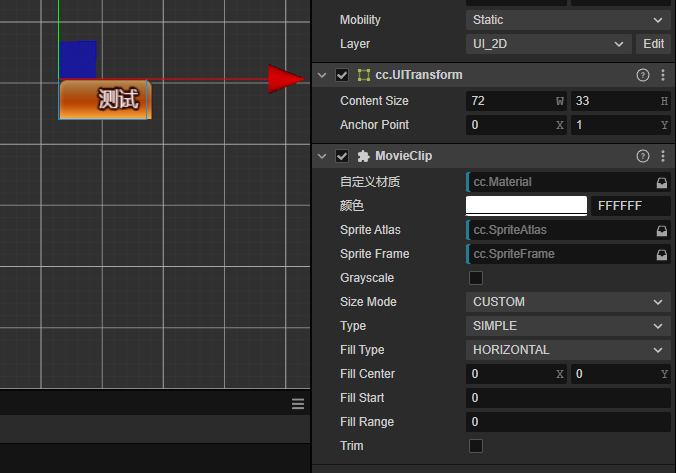 有人遇到过这种问题吗?就是图片的宽度是关联了文字的宽度,但是第一次会出现图片的显示的宽度和ContentSize 不一致。一定要刷新下才行,比如:把MovieClip 重新设置active 或者contentSize 在修改下才能显示正常了
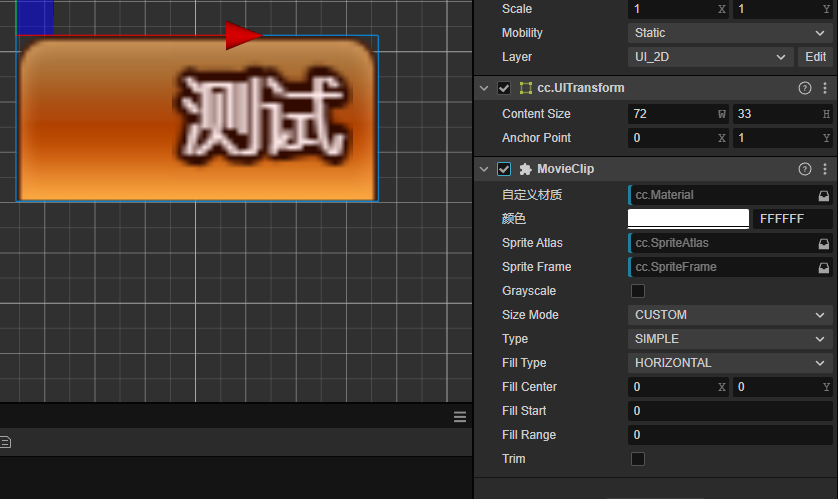
请问这个怎么用,需要down这个工程才行吗?
可以去npm原来的库,然后把我这边的dist目录下的文件替换了就行了