
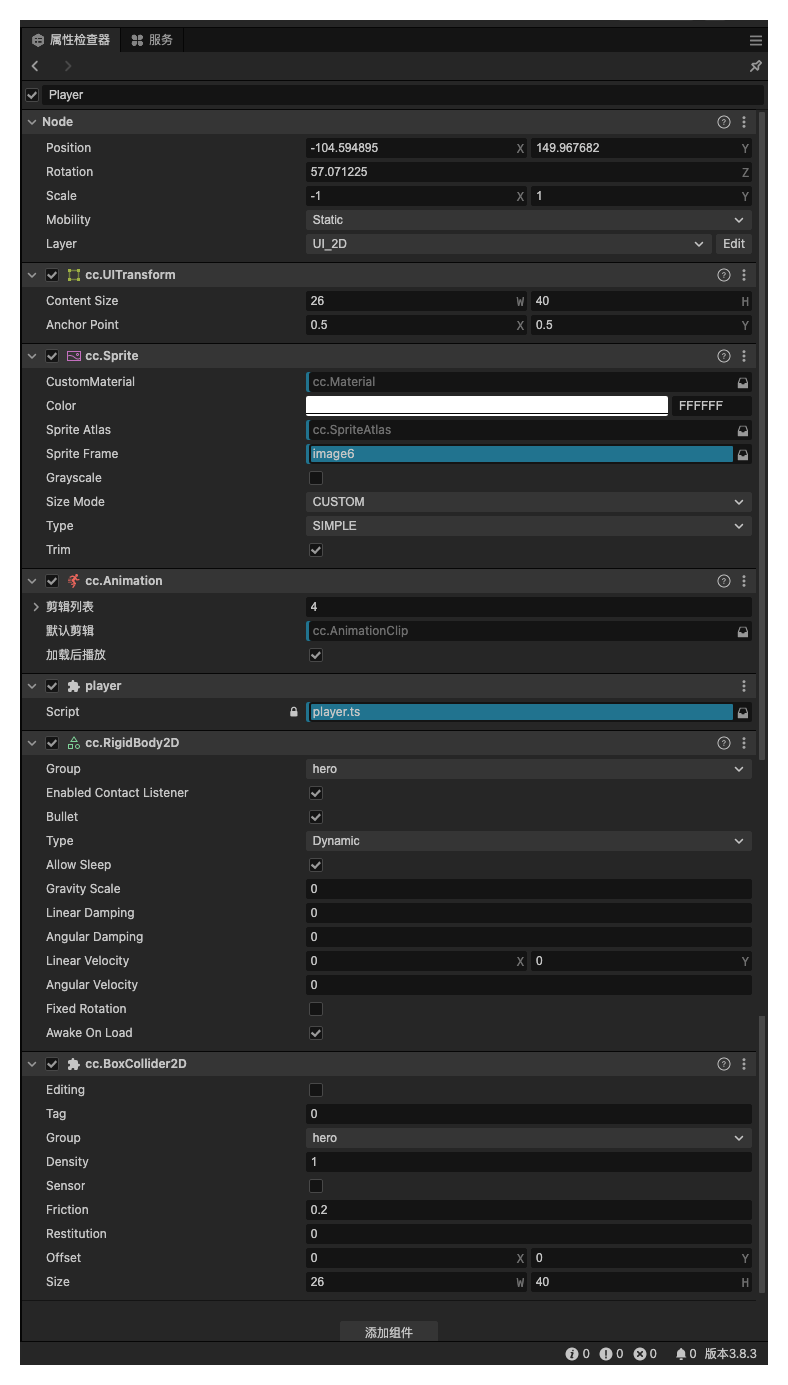
遇到的问题图,当碰撞体接触时,持续继续移动,则会穿过碰撞体

Player 属性检查
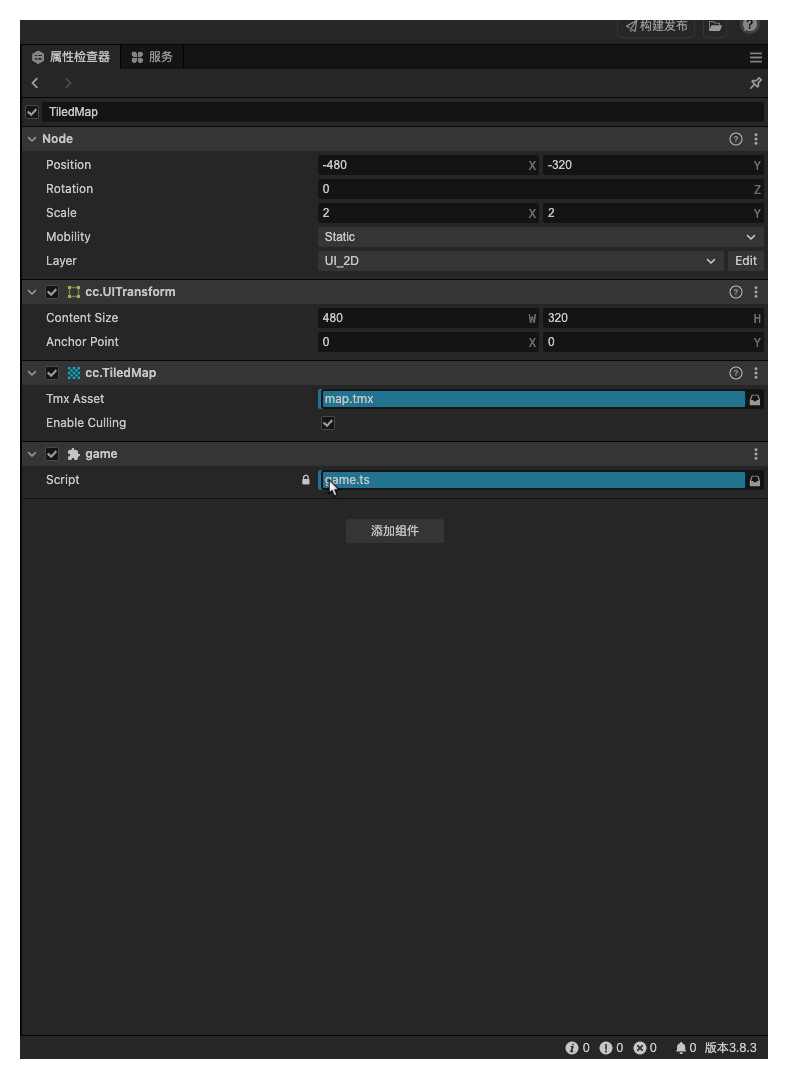
tilemap 属性检查
玩家Player移动代码
import {
  _decorator,
  Component,
  EventKeyboard,
  Input,
  input,
  KeyCode,
  Vec3,
  Animation,
  Vec2,
  RigidBody2D,
} from "cc";
const { ccclass, property } = _decorator;

@ccclass("player")
export class player extends Component {
  private an: Animation;
  private speedDirection = new Vec2(0, 0);
  private currentPosition = new Vec3(0, 0, 0);
  private isMoving = false;
  private speed = 50;
  start() {
    this.an = this.node.getComponent(Animation);
    this.node.getComponent(RigidBody2D).fixedRotation = false;
    // this.node
    //   .getComponent(Collider2D)
    //   .on(Contact2DType.END_CONTACT, () => (this.isContact = false));
    // console.log(this.node.getComponent(Collider2D).group);
    input.on(Input.EventType.KEY_DOWN, this.onkeydown, this);
    input.on(Input.EventType.KEY_UP, this.onkeyup, this);
  }
  onBeginContact(e) {
    this.speedDirection.x = 0;
    this.speedDirection.y = 0;
  }
  onkeyup() {
    if (this.speedDirection.y === -1) {
      this.an.play("idle");
    }
    this.speedDirection.x = 0;
    this.speedDirection.y = 0;
    this.isMoving = false;
  }
  onkeydown(e: EventKeyboard) {
    switch (e.keyCode) {
      case KeyCode.ARROW_UP: {
        this.an.play("up_move");
        this.isMoving = true;
        this.speedDirection.y = 1;
        break;
      }
      case KeyCode.ARROW_DOWN: {
        this.an.play("down_move");
        this.isMoving = true;
        this.speedDirection.y = -1;
        break;
      }
      case KeyCode.ARROW_LEFT: {
        this.node.setScale(-1, 1, 1);
        this.an.play("left_right_move");
        this.isMoving = true;
        this.speedDirection.x = -1;
        break;
      }
      case KeyCode.ARROW_RIGHT: {
        this.node.setScale(1, 1, 1);
        this.an.play("left_right_move");
        this.isMoving = true;
        this.speedDirection.x = 1;
        break;
      }
      default: {
        break;
      }
    }
  }
  update(deltaTime: number) {
    if (this.isMoving) {
      this.node.getPosition(this.currentPosition);
      const deltaPosition = new Vec3(
        this.speed * this.speedDirection.x * deltaTime,
        this.speed * this.speedDirection.y * deltaTime,
        0
      );
      Vec3.add(this.currentPosition, this.currentPosition, deltaPosition);
      this.node.setPosition(this.currentPosition);
    }
  }
}
tilemap 的脚本
import {
    _decorator, // 导入装饰器
    BoxCollider2D, // 导入2D盒子碰撞体组件
    Component, // 导入组件基类
    director, // 导入导演类,用于场景管理
    EPhysics2DDrawFlags, // 导入2D物理绘制标志
    ERigidBody2DType, // 导入2D刚体类型枚举
    Node, // 导入节点类
    PhysicsSystem2D, // 导入2D物理系统
    RigidBody2D, // 导入2D刚体组件
    TiledLayer, // 导入瓦片图层组件
    TiledMap, // 导入瓦片地图组件
    v2, // 导入向量2D类
  } from "cc"; // 从Cocos Creator导入所需的模块

  const { ccclass, property } = _decorator; // 使用装饰器来定义类和属性

  // 定义game类,继承自Component
  @ccclass("game")
  export class game extends Component {
    // 当组件被加载时调用
    start() {
      // 开启2D物理系统的调试绘制功能
      PhysicsSystem2D.instance.debugDrawFlags = EPhysics2DDrawFlags.All;
      // 打印物理系统的分组信息
      console.log(PhysicsSystem2D.PhysicsGroup);
      // 获取当前节点的TiledMap组件
      const tiledMap = this.node.getComponent(TiledMap);
      // 获取瓦片大小
      let tiledSize = tiledMap.getTileSize();
      // 获取名为"wall"的图层
      let layer = tiledMap.getLayer("wall");
      // 获取图层大小
      let layerSize = layer.getLayerSize();
      // 打印图层大小
      console.log(layerSize);
      // 遍历图层中的每个瓦片
      for (let i = 0; i < layerSize.width; i++) {
        for (let j = 0; j < layerSize.height; j++) {
          // 获取当前瓦片
          let tiled = layer.getTiledTileAt(i, j, true);
          // 如果瓦片不是空的
          if (tiled.grid !== 0) {
            // 为瓦片节点添加刚体组件,并设置为静态类型
            let body = tiled.node.addComponent(RigidBody2D);
            body.type = ERigidBody2DType.Static;
            // 唤醒刚体
            body.wakeUp();
            // 设置刚体分组
            body.group = 2;
            // 为瓦片节点添加碰撞体组件
            let collider = tiled.node.addComponent(BoxCollider2D);
            // 设置碰撞体分组
            collider.group = 2;
            // 设置碰撞体的偏移量,使其居中
            collider.offset = v2(tiledSize.width / 2, tiledSize.height / 2);
            // 设置碰撞体的大小
            collider.size = tiledSize;
            // 应用碰撞体设置
            collider.apply();
          }
        }
      }
    }

    // 每帧调用的更新函数
    update(deltaTime: number) {}
  }