
小白也能写框架之【七、事件管理器】

接上篇:

小白也能写框架之【六、音频管理器】

说明:
这个事件管理器借鉴了商城的一个事件系统
之前自己写了N个,但是实际开发中都不理想,包括使用了cocos自带的EventTarget都差点效果
目前这个事件管理器除了常规的监听订阅、发布、销毁,还有一个很重要的数据持久化功能。

举个例子:
我使用websocket通信需要进行加密,那么和服务端握手后,会得到来自服务端发送的通信加密key
然后我又不想把key暴露到本地保存,但是可以使用数据持久化保存这个key

一、上主菜

assets\Core\Scripts\Managers\EventMgr.ts

/**

 * 事件管理器

 * 该类用于管理事件的注册、触发和注销。

 */

class EventMgr {

    /** 唯一ID生成器,用于为每个事件处理器分配唯一的ID */

    private uniqueId = 0;

    /** 存储所有事件处理器,键为唯一ID */

    private handlers: { [id: number]: { callback: Function, target: any, key: string; }; } = {};

    /** 存储每个目标对象对应的事件处理器ID集合 */

    private targetMap: Map<any, Set<number>> = new Map();

    /** 存储每个事件名对应的事件处理器ID集合 */

    private keyMap: Map<string, Set<number>> = new Map();

    /** 存储每个目标对象对应的事件名和处理器ID的映射 */

    private targetKeyMap: Map<any, { [key: string]: number; }> = new Map();

    /** 存储持久化的数据,键为事件名 */

    private persistentData: { [key: string]: any; } = {};

    /** 存储粘性事件的数据,键为事件名 */

    private stickyData: { [key: string]: any; } = {};

    /** 私有构造函数,确保外部无法直接通过new创建实例 */

    private constructor() {}

    /** 单例实例 */

    public static readonly instance: EventMgr = new EventMgr();

    /**

     * 注册事件

     * @param key 事件名

     * @param callback 回调函数,当事件触发时调用

     * @param target 回调函数的上下文(默认值为 {})

     */

    public on(key: string, callback: (data: any) => void, target: any = {}) {

        const id = this.getOrCreateId(key, target);

        this.handlers[id] = { callback, target, key };

        this.addIdToMap(this.targetMap, target, id);

        this.addIdToMap(this.keyMap, key, id);

        const sticky = this.stickyData[key];

        if (sticky) {

            callback.call(target, sticky);

            delete this.stickyData[key];

        }

    }

    /**

     * 触发事件

     * @param key 事件名

     * @param data 传递给回调函数的数据

     * @param options 其他参数

     *  persistence 是否持久化数据

     *  sticky 传1则为粘性事件

     */

    public emit(key: string, data?: any, options: { persistence?: boolean, sticky?: number; } = {}) {

        if (options.persistence) this.persistentData[key] = data;

        const ids = this.keyMap.get(key);

        if (ids) {

            ids.forEach(id => {

                const { callback, target } = this.handlers[id];

                callback.call(target, data);

                if (options.sticky === 1) options.sticky = -1;

            });

        }

        if (options.sticky === 1) this.stickyData[key] = data;

    }

    /**

     * 获取持久化数据

     * @param key 事件名

     * @returns 持久化的数据

     */

    public getPersistentData(key: string) {

        return this.persistentData[key];

    }

    /**

     * 注销事件

     * @param key 事件名

     * @param target 目标对象

     */

    public off(key: string, target: any) {

        const targetKeys = this.targetKeyMap.get(target);

        if (targetKeys) this.removeHandler(targetKeys[key]);

    }

    /**

     * 注销目标对象的所有事件

     * @param target 目标对象

     */

    public offAllByTarget(target: any) {

        this.removeAllHandlers(this.targetMap.get(target));

    }

    /**

     * 注销某个事件名的所有事件

     * @param key 事件名

     */

    public offAllByKey(key: string) {

        this.removeAllHandlers(this.keyMap.get(key));

    }

    /**

     * 获取或创建唯一ID

     * @param key 事件名

     * @param target 目标对象

     * @returns 唯一ID

     */

    private getOrCreateId(key: string, target: any): number {

        let targetKeys = this.targetKeyMap.get(target) || {};

        const id = targetKeys[key] || ++this.uniqueId;

        targetKeys[key] = id;

        this.targetKeyMap.set(target, targetKeys);

        return id;

    }

    /**

     * 移除处理器

     * @param id 处理器ID

     */

    private removeHandler(id: number) {

        const handler = this.handlers[id];

        if (!handler) return;

        const { target, key } = handler;

        delete this.targetKeyMap.get(target)[key];

        this.targetMap.get(target).delete(id);

        this.keyMap.get(key).delete(id);

        delete this.handlers[id];

        delete this.persistentData[key];

    }

    /**

     * 移除所有处理器

     * @param ids 处理器ID集合

     */

    private removeAllHandlers(ids: Set<number>) {

        if (ids) ids.forEach(id => this.removeHandler(id));

    }

    /**

     * 将ID添加到映射中

     * @param map 映射

     * @param key 键

     * @param id ID

     */

    private addIdToMap(map: Map<any, Set<number>>, key: any, id: number) {

        const set = map.get(key) || new Set();

        set.add(id);

        map.set(key, set);

    }

}

/** 事件管理器实例 */

export const eventMgr = EventMgr.instance;

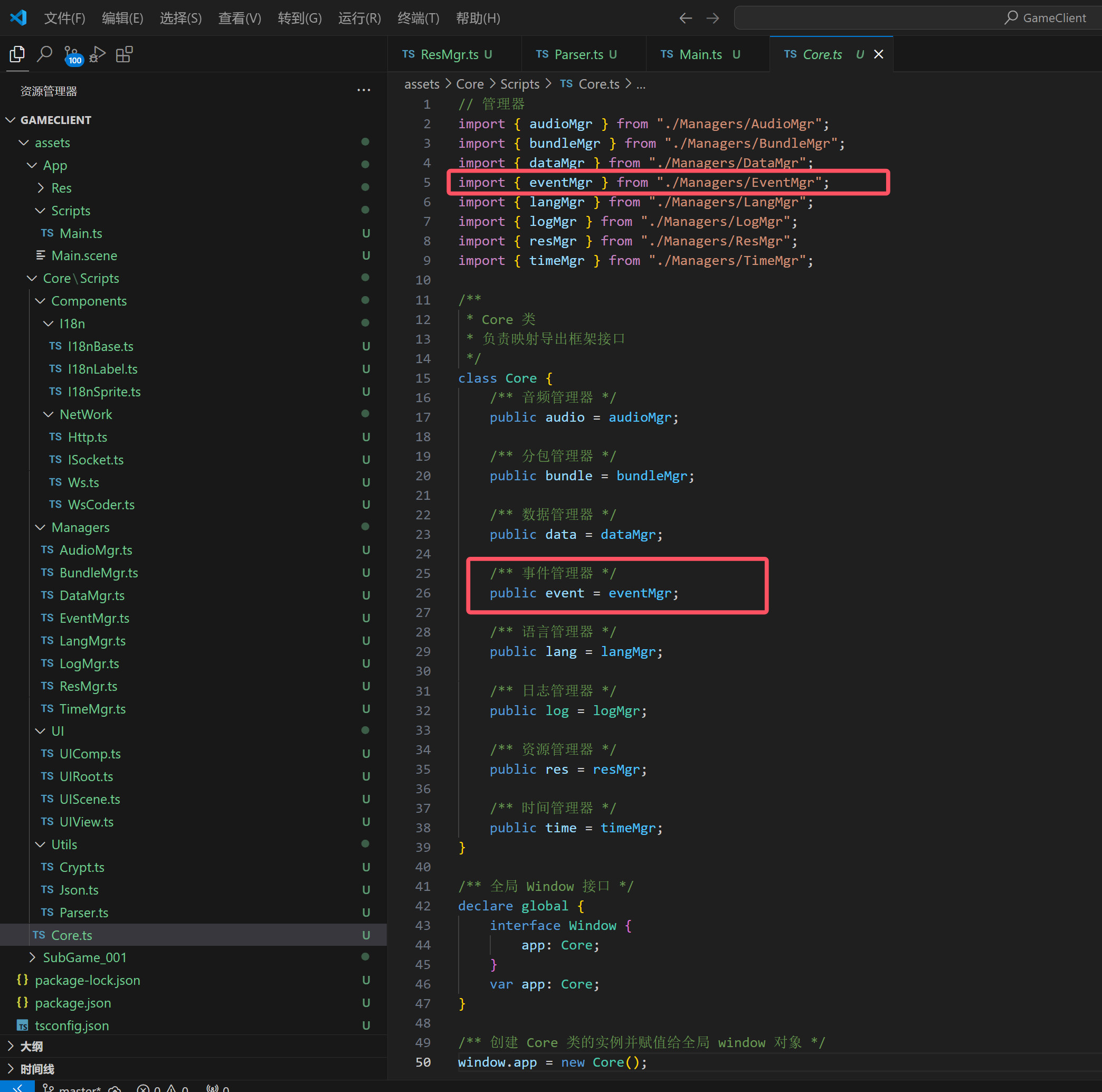
二、全局映射
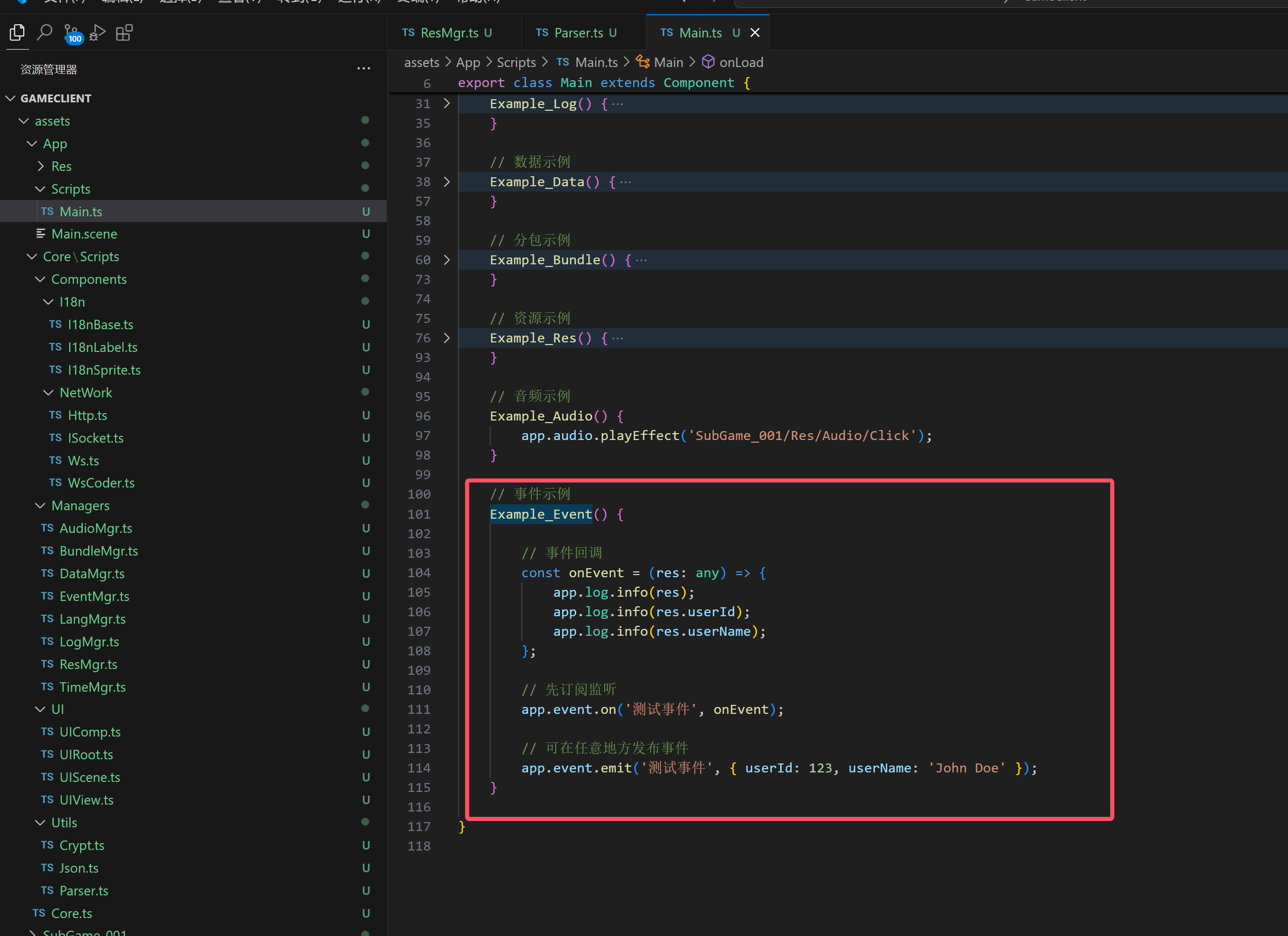
三、使用示例
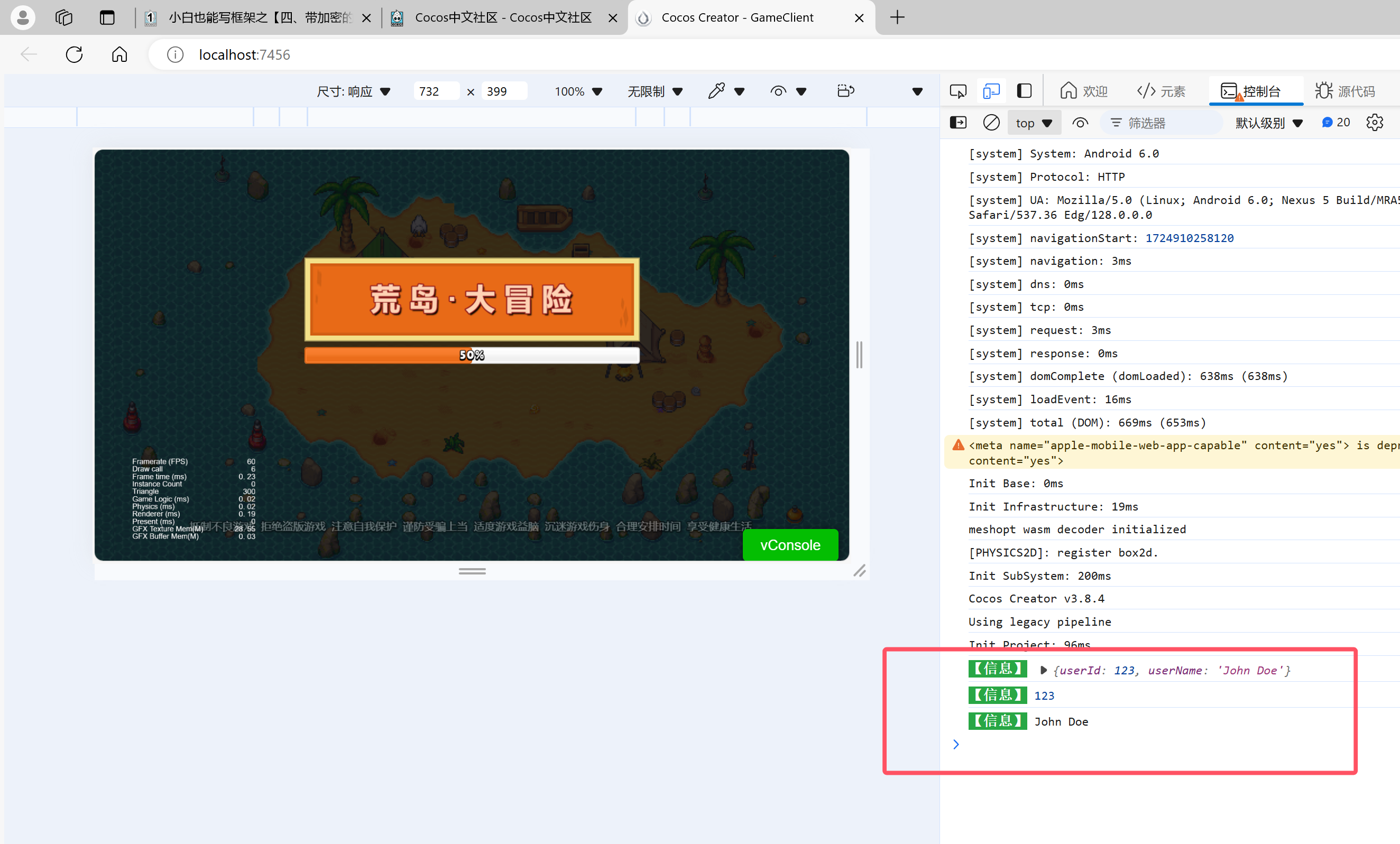
四、效果展示
下一篇预告:
小白也能写框架之【八、任务管理器】

emit 过程有可能删除事件本身

怎么说?请大佬指定一下

你看下官方 EventTarget 的实现。
或者 Laya 的 Delegate 的源码。

就是 emit 的时候,调用了 targetOff 这样的接口,

我没使用cocos的EventTarget 这个API

我是单独的,目前没发现emit 自我删除

哥们帮忙看下:

EventMgr.ts

import { logMgr } from "./LogMgr";

/**

 * 事件回调函数类型定义

 * @template T 事件数据的类型

 */

type EventCallback<T = any> = (data: T) => void;

/**

 * 事件处理器接口

 */

interface Handler {

    /** 回调函数 */

    callback: EventCallback;

    /** 回调函数的上下文 */

    target: any;

    /** 事件名 */

    key: string;

    /** 事件优先级 */

    priority: number;

}

class EventMgr {

    /** 唯一ID生成器,用于为每个事件处理器分配唯一的ID */

    private uniqueId = 0;

    /** 存储所有事件处理器,键为唯一ID */

    private handlers: { [id: number]: Handler } = {};

    /** 存储每个目标对象对应的事件处理器ID集合 */

    private targetMap: Map<any, Set<number>> = new Map();

    /** 存储每个事件名对应的事件处理器ID集合 */

    private keyMap: Map<string, Set<number>> = new Map();

    /** 存储每个目标对象对应的事件名和处理器ID的映射 */

    private targetKeyMap: Map<any, { [key: string]: number; }> = new Map();

    /** 存储持久化的数据,键为事件名 */

    private persistentData: { [key: string]: any; } = {};

    /** 存储粘性事件的数据,键为事件名 */

    private stickyData: { [key: string]: any; } = {};

    /** 私有构造函数,确保外部无法直接通过new创建实例 */

    private constructor() {}

    /** 单例实例 */

    public static readonly instance: EventMgr = new EventMgr();

    /**

     * 注册事件

     * @param key 事件名

     * @param callback 回调函数,当事件触发时调用

     * @param target 回调函数的上下文(默认值为 {})

     * @param priority 事件优先级(默认值为 0)

     */

    public on(key: string, callback: EventCallback, target: any = {}, priority: number = 0): void {

        const id = this.getOrCreateId(key, target);

        this.handlers[id] = { callback, target, key, priority };

        this.addIdToMap(this.targetMap, target, id);

        this.addIdToMap(this.keyMap, key, id);

        const sticky = this.stickyData[key];

        if (sticky) {

            callback.call(target, sticky);

            delete this.stickyData[key];

        }

    }

    /**

     * 触发事件

     * @param key 事件名

     * @param data 传递给回调函数的数据

     * @param options 其他参数

     *  persistence 是否持久化数据

     *  sticky 传1则为粘性事件

     */

    public emit(key: string, data?: any, options: { persistence?: boolean, sticky?: number; } = {}): void {

        if (options.persistence) this.persistentData[key] = data;

        const ids = this.keyMap.get(key);

        if (ids) {

            const handlers = Array.from(ids).map(id => this.handlers[id]);

            handlers.sort((a, b) => b.priority - a.priority);

            const isSticky = options.sticky === 1;

            handlers.forEach(({ callback, target }) => {

                callback.call(target, data);

                if (isSticky) options.sticky = -1;

            });

        }

        if (options.sticky === 1) this.stickyData[key] = data;

    }

    /**

     * 获取持久化数据

     * @param key 事件名

     * @returns 持久化的数据

     */

    public getPersistentData(key: string): any {

        return this.persistentData[key];

    }

    /**

     * 注销事件

     * @param key 事件名

     * @param target 目标对象

     * @param callback 注销后的回调函数

     */

    public off(key: string, target: any, callback?: () => void): void {

        const targetKeys = this.targetKeyMap.get(target);

        if (targetKeys) {

            this.removeHandler(targetKeys[key]);

            if (callback) callback();

        }

    }

    /**

     * 注销目标对象的所有事件

     * @param target 目标对象

     */

    public offAllByTarget(target: any): void {

        this.removeAllHandlers(this.targetMap.get(target));

    }

    /**

     * 注销某个事件名的所有事件

     * @param key 事件名

     */

    public offAllByKey(key: string): void {

        this.removeAllHandlers(this.keyMap.get(key));

    }

    /**

     * 获取或创建唯一ID

     * @param key 事件名

     * @param target 目标对象

     * @returns 唯一ID

     */

    private getOrCreateId(key: string, target: any): number {

        let targetKeys = this.targetKeyMap.get(target);

        if (!targetKeys) {

            targetKeys = {};

            this.targetKeyMap.set(target, targetKeys);

        }

        if (!targetKeys[key]) {

            targetKeys[key] = ++this.uniqueId;

        }

        return targetKeys[key];

    }

    /**

     * 移除处理器

     * @param id 处理器ID

     */

    private removeHandler(id: number): void {

        const handler = this.handlers[id];

        if (!handler) return;

        const { target, key } = handler;

        const targetKeys = this.targetKeyMap.get(target);

        if (targetKeys) delete targetKeys[key];

        const targetSet = this.targetMap.get(target);

        if (targetSet) targetSet.delete(id);

        const keySet = this.keyMap.get(key);

        if (keySet) keySet.delete(id);

        delete this.handlers[id];

        delete this.persistentData[key];

    }

    /**

     * 移除所有处理器

     * @param ids 处理器ID集合

     */

    private removeAllHandlers(ids?: Set<number>): void {

        if (ids) ids.forEach(id => this.removeHandler(id));

    }

    /**

     * 将ID添加到映射中

     * @param map 映射

     * @param key 键

     * @param id ID

     */

    private addIdToMap(map: Map<any, Set<number>>, key: any, id: number): void {

        const set = map.get(key) || new Set<number>();

        set.add(id);

        map.set(key, set);

    }

    /**

     * 重置事件管理器,清空所有事件和数据

     */

    public reset(): void {

        this.uniqueId = 0;

        this.handlers = {};

        this.targetMap.clear();

        this.keyMap.clear();

        this.targetKeyMap.clear();

        this.persistentData = {};

        this.stickyData = {};

    }

    /**

     * 输出当前注册的事件和处理器信息

     */

    public debug(): void {

        logMgr.debug('处理器:', this.handlers);

        logMgr.debug('目标映射:', this.targetMap);

        logMgr.debug('事件名映射:', this.keyMap);

        logMgr.debug('目标事件映射:', this.targetKeyMap);

        logMgr.debug('持久化数据:', this.persistentData);

        logMgr.debug('粘性数据:', this.stickyData);

    }

}

/** 事件管理器实例 */

export const eventMgr = EventMgr.instance;

可以参考下马赛克的框架 事件管理上类型安全还是很有必要的

有几个点很让人疑惑:
1、你这事件里还有持久化数据,为啥持久化数据要做在事件模块里,直接违反单一职责原理。大多数事件 模块的实现都不不会加你这种机制,所以你这个机制在我看来肯定是有问题的;(事件本质就是订阅通知,底层的这个持久化数据的必要性有待商榷);

2、你事件派发的时候,map 了一个数组出来,事件每次派发就多一个数组出来,这个没必要(虽然 pureMVC 的 ts 代码实现也是这样的,但肯定不好)。

3、你事件还有个 priority,事件派发还有优先级的。这里业务复杂度就上去了。同一事件的订阅者,处理的逻辑应该是相互独立不影响的。有先后关系的业务逻辑,通过订阅同一个事件,设置不同优先级,在2个逻辑块里实现,这样是有问题的:有先后关系,说明逻辑有依赖,有依赖的东西最好是集中写在一起。(要不然你想,你订阅是 2 个地方订阅,逻辑实现肯定也是写 2 个地方,然后别人还得知道你这 2 个订阅是有优先级关系,这代码谁能看。。。)
4、还有你这个粘性机制,还没认真看,但是感觉应该也没必要。。。

赞同你的说法,当时参考了任务事件管理器的写法
弄了个优先级,我也感觉也没必要。

但是持久化和粘性数据是非常有必要的
像一些需要按步骤完成的游戏逻辑,比如解密关卡的游戏
玩家解密了1、2、3、5关,然后对应通知了玩家解密1、2、3、5关,这时可以用持久化保存下来
然后程序就可以通过这个持久数据判断,玩家还有第4关没解密

这样就避免每次通知,还要自己单独开一个变量来保存玩家解密了哪些关卡

粘性数据,也是有必要的
在事件触发时,将数据保存下来,并在未来某个时刻,当有新的监听器注册到该事件时,立即将数据传递给新的监听器

这种使用场景在游戏里需要用到的地方太多了,举个例子:
玩家在某个关卡中触发了隐藏任务,这时可以派发粘性数据的事件,以便在下一个未实例的关卡,改变一些玩法。
好比黑猴子这个游戏,你完成了一些隐藏的任务,会触发不同的游戏结局,这些结局的场景并未实例化。怎么通知这些未实例化的场景呢,粘性数据事件不是就可以用到了么,不用额外添加一个过渡变量,
虽然粘性数据也属于变量,但是管理器方便啊。载入结局场景了,就可以清理相关事件了,不是很方便么?

实际吧开发游戏跟数学一样,条条大路通罗马,一个逻辑有很多写法,好用适合自己就行!
所以你说的也是有道理的,嘿嘿,多谢指点 :grin:

框架最好脱离一般游戏逻辑
框架最好是功能独立的,可组装的
个人理解啊~

赞同

但我也只是加了一个自己常用的功能,所以参数都是可选的,也可以按常规事件使用
开发者可以选择使用,也可以不使用,最终实现的逻辑还是由开发者决定的

事件系统应该只做事件的派发:
1.玩家解密了1,2,3,5关卡,这个数据应该由数据的通知者存储,比如全部通关时打开一个奖励界面。这时候需要对应的界面开发监听等级变化,并在关卡管理中查询所有关卡的通关情况。
2.黑猴同理,或许可以实现一个任务系统?将隐藏的任务状态存储在这个系统类,在实例化场景的时候查询任务系统的数据再实例化。
3.或许你可以创建一个持久化系统的管理模块
4.当然,一切以你为准

是的最终实现的功能都是一样的,但是管理起来很方便啊
注销场景、随之注销事件,这个时候数据就随之自动注销了,不用自己手动去释放数据

如果单独弄一个数据系统或者单独开一个全局变量维护,你会发现释放场景时经常忘记释放这类变量

针对小白这种情况更多,经常创建一些全局变量,然后注销场景时,这些变量经常忘记清理,导致慢慢内存增加。