请问spine的资源是什么版本,这个要求4.2+;请留意creator 中的相关警告
就是spine 4.2
你好,可以提供demo吗
我们这边逻辑很复杂,暂时没有好的demo, 我再看看能不能找个简单的方法重现
你说的方法只是销毁的SkeletonCache的数据,AnimationCache的数据并没有清理啊
animationCache是由skeletonCache 缓存的
还真是,原来可以曲线救国 
web测试正常,但是安卓下会报错,_skeleton没有setSkin 这个方法,请问有解吗
那完了 我只测试过iOS和web
补充下这个问题只有在iOS的wkwebview和iphone的safari中出现 pc的浏览器中不会 估计是内存的问题
目前能在代码中动态扩展Node面板给它添加一个自定义的属性,且支持序列化吗?
应用和游戏是两个完全不同的程序类型,没有在两者之间统一框架的必要。应用更多依赖系统提供的UI框架、系统服务、事件通知和回调,生命周期更多是靠系统来管理;而游戏更倾向于主动向系统轮询设备状态,自己管理软硬件资源而非托管给系统。用游戏引擎做应用多半会更耗电且体验更差。
1赞
提一个bug
场景描述是这个链接 Cocos Creator 3.8.6 社区版公测贴【3.14】
抖音或者微信小游戏构建后会报错如下
debug.ts:92 TypeError: Cannot use ‘in’ operator to search for ‘_data’ in null
at isNativeImage (image-asset.ts:168)
at ImageAsset.get (image-asset.ts:573)
at CustomIconBillBoard.fillIcon (CustomIconBillBoard.ts:378)
at CustomIconBillBoard.updateTexture (CustomIconBillBoard.ts:124)
at CustomIconBillBoard.start (CustomIconBillBoard.ts:71)
at eval (component-scheduler.ts:277)
at OneOffInvoker.eval [as _invoke] (component-scheduler.ts:262)
at OneOffInvoker.invoke (component-scheduler.ts:162)
at ComponentScheduler.startPhase (component-scheduler.ts:478)
at Director.tick (director.ts:778)
屏幕不方便截图,所以打字,针对image-asset.ts的573行,debugger输出信息如下
- loaded: true
- _callbackTable: null
- _exportedExts: undefined
- _file: null
- _format: 35
- _height: 0
- _name: “”
- _native: “”
- _nativeData: null
- _nativeUrl: “”
- _objFlags: 5
- _ref: 0
- _width: 0
- data: [Exception: TypeError: Cannot use ‘in’ operator to search for ‘_data’ in null at isNativeImage (cocos-js/_virtual_cc-BW9nqqx4.js:23310:28) at ImageAsset.get (cocos-js/_virtual_cc-BW9nqqx4.js:23649:17) at ImageAsset.invokeGetter (
 32) at ImageAsset.get (cocos-js/_virtual_cc-BW9nqqx4.js:23649:13) at CustomIconBillBoard.fillIcon (src/bundle-scripts/main/index.js:4051:103) at CustomIconBillBoard.updateTexture (src/bundle-scripts/main/index.js:3800:29) at CustomIconBillBoard.start (src/bundle-scripts/main/index.js:3749:16) at eval (cocos-js/_virtual_cc-BW9nqqx4.js:43808:16) at OneOffInvoker.eval [as _invoke] (cocos-js/_virtual_cc-BW9nqqx4.js:43780:13) at OneOffInvoker.invoke (cocos-js/_virtual_cc-BW9nqqx4.js:43725:16)]
 - format: (…)
- height: (…)
- hideFlags: (…)
- isCompressed: (…)
- isValid: (…)
- mipmapLevelDataSize: (…)
- name: (…)
- nativeAsset: (…)
- nativeUrl: (…)
- refCount: (…)
- url: (…)
- uuid: (…)
- width: (…)
- _nativeAsset: (…)
- _nativeDep: (…)
- _uuid: “ddbb95fe-be7b-452e-93de-72b4ccf7a3b3”
- [[Prototype]]: Asset
可以看到this代表的ImageAsset对象是存在的,但是_nativeData数据却丢失了,所以获取data做检查的时候,也就是image-asset.ts:168行会报错
// 返回该图像源是否是平台提供的图像对象。
function isNativeImage (imageSource: ImageSource): imageSource is (HTMLImageElement | HTMLCanvasElement | ImageBitmap) {
if (ALIPAY || TAOBAO || TAOBAO_MINIGAME || XIAOMI || WECHAT_MINI_PROGRAM || BYTEDANCE) {
// We’re unable to grab the constructors of Alipay native image or canvas object.
return !(’_data’ in imageSource);
}
if (JSB && (imageSource as IMemoryImageSource)._compressed === true) {

    return false;

}
return imageSource instanceof HTMLImageElement || imageSource instanceof HTMLCanvasElement || isImageBitmap(imageSource);
}
原生平台上怎么解压zip文件到指定文件夹???
复现方式还是用你之前的 demo 吗?
是的,点击重新贴图按钮就行
设计宽度
设计高度
适配屏幕宽度
适配屏幕高度
3D 高质量模式
资源下载并发数
默认编辑场景
cc.SceneAsset
资源预览
动画编辑器
动画图
控制台
清空
正则
Log
Info
Warning
Error
[Assets] Can not find texture “22_P2204_girl_suit02_202501860.png” for atlas “F:\download\SpineTest\SpineTest\assets\resources\line_9\all_girl_encrypted.atlas”
[Assets] Can not find texture “22_P2204_girl_suit02_202501825.png” for atlas “F:\download\SpineTest\SpineTest\assets\resources\line_9\all_girl_encrypted.atlas”
[Assets] Can not find texture “21_P2102_girl_single02_202501421.png” for atlas “F:\download\SpineTest\SpineTest\assets\resources\line_9\all_girl_encrypted.atlas”
[Assets] Can not find texture “22_P2215_girl_suit02_202501419.png” for atlas “F:\download\SpineTest\SpineTest\assets\resources\line_9\all_girl_encrypted.atlas”
[Assets] Can not find texture “22_P2214_girl_suit02_202501425.png” for atlas “F:\download\SpineTest\SpineTest\assets\resources\line_9\all_girl_encrypted.atlas”
[Assets] Can not find texture “22_P2206_girl_suit02_2025011066.png” for atlas “F:\download\SpineTest\SpineTest\assets\resources\line_9\all_girl_encrypted.atlas”
[Assets] Can not find texture “22_P2215_girl_suit02_2025011063.png” for atlas “F:\download\SpineTest\SpineTest\assets\resources\line_9\all_girl_encrypted.atlas”
[Assets] Can not find texture “22_P2213_girl_suit02_2025011066.png” for atlas “F:\download\SpineTest\SpineTest\assets\resources\line_9\all_girl_encrypted.atlas”
[Assets] Can not find texture “22_P2211_girl_suit02_202501829.png” for atlas “F:\download\SpineTest\SpineTest\assets\resources\line_9\all_girl_encrypted.atlas”
[Assets] Can not find texture “21_P2102_girl_suit02_2025014165.png” for atlas “F:\download\SpineTest\SpineTest\assets\resources\line_9\all_girl_encrypted.atlas”
[Assets] Can not find texture “21_P2106_girl_suit02_2025011064.png” for atlas “F:\download\SpineTest\SpineTest\assets\resources\line_9\all_girl_encrypted.atlas”
[Assets] Can not find texture “22_P2214_girl_suit02_2025011049.png” for atlas “F:\download\SpineTest\SpineTest\assets\resources\line_9\all_girl_encrypted.atlas”
[Assets] Can not find texture “22_P2202_girl_suit02_2025011011.png” for atlas “F:\download\SpineTest\SpineTest\assets\resources\line_9\all_girl_encrypted.atlas”
[Assets] Can not find texture “22_P2204_girl_suit02_2025011014.png” for atlas “F:\download\SpineTest\SpineTest\assets\resources\line_9\all_girl_encrypted.atlas”
是否缺失了资源? 另外 library, temp等目录不用上传
这是设计故意这么做的 只显示需要的部分
protected _assignImage (image: ImageAsset, level: number, arrayIndex?: number): void {
        const data = image.data;
        if (!data) {
            return;
        }
        this.uploadData(data, level, arrayIndex);
        this._checkTextureLoaded();

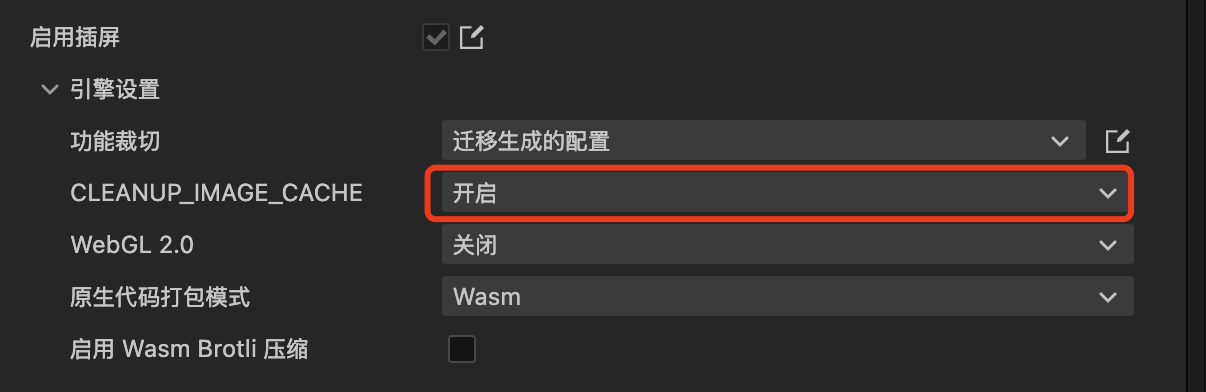
        if (macro.CLEANUP_IMAGE_CACHE) { // --> 小游戏平台,默认会开启清除图片缓存,以降低内存。web 平台因为浏览器底层会优化,因此默认关闭的。这导致了差异。
            const deps = dependUtil.getDeps(this._uuid);
            const index = deps.indexOf(image._uuid);
            if (index !== -1) {
                js.array.fastRemoveAt(deps, index);
                image.decRef(); // --> 这里会释放图片资源
            }
        }
    }
关闭Image自动清除功能,应该就没问题了。