
《游戏人工智能编程案例精粹》Cocos Creator版 项目快速复用参考
本文是Cocos Store商店资源“《游戏人工智能编程案例精粹》(PGame AI by Example)”,项目快速复用参考指南。重在帮助大家快速复用资源内的AI技术到自己的项目中。下面将分几个模块详细说明。
有限状态机(FSM)
几乎所有类型的游戏,都能用到状态机技术。StateMachine类封装了状态管理类,内含当前状态信息。State类是具体状态的接口定义。为游戏内需要拥有状态的实体,实例化一个StateMachine对象,然后再实现具体的State类型,便可以轻松控制实体状态转换。
状态机的重点在于具体状态的实现,资源内的《简单足球》游戏,大量使用了状态机逻辑,可以参照该游戏来使用状态机。
/**

 * 状态管理类

 */

@ccclass('StateMachine')

export class StateMachine<T> {

    private _owner: T = null; // 拥有次状态机的实例

    private _currentState: State<T> = null; //当前状态

    private _previousState: State<T> = null; //之前的一个状态

    private _globalState: State<T> = null; //全局状态

    constructor(owner: T) {

        this._owner = owner;

    }

    ...

    update() {

        if (this._globalState) {

            this._globalState.Execute(this._owner);

        }

        if (this._currentState) {

            this._currentState.Execute(this._owner);

        }

    }

    /**

     * 处理消息

     */

    handleMessage(msg: Telegram): boolean {

        if (this._currentState && this._currentState.OnMessage(this._owner, msg)) {

            return true;

        }

        if (this._globalState && this._globalState.OnMessage(this._owner, msg)) {

            return true;

        }

        return false;

    }

    /**

     * 改变当前状态

     */

    changeState(newState: State<T>) {

        assert(!!newState, "<StateMachine::ChangeState>:trying to assign null state to current");

        this._previousState = this._currentState;

        this._currentState.Exit(this._owner);

        this._currentState = newState;

        this._currentState.Enter(this._owner);

    }

    /**

     * 切换到上一个状态

     */

    revertToPreviousState() {

        this.changeState(this._previousState);

    }

    ...

}
//State接口类

export interface State<T> {

    /**

     * 进入状态时执行

     * @param T

     */

    Enter(T);

    /**

     * 每个更新周期都要执行

     * @param T

     */

    Execute(T);

    /**

     * 退出状态时执行

     * @param T

     */

    Exit(T);

    /**

     * 收到dispatcher的消息时,执行

     * @param T

     */

    OnMessage(T, Telegram): boolean;

}
下面2个例子,分别是球队自身的进攻状态,队员带球状态的逻辑实现
/**

 * 球队进攻状态

 */

@ccclass('SoccerTeamAttackingState')

export class SoccerTeamAttackingState implements State<SoccerTeam> {

    private static _instance: SoccerTeamAttackingState = null;

    public static instance(): SoccerTeamAttackingState {

        if (this._instance == null) {

            this._instance = new SoccerTeamAttackingState();

        }

        return this._instance;

    }

    private constructor() {}

    /**

     * 进入状态时执行

     */

    Enter(team: SoccerTeam) {

        SoccerPitch.debugInfoPrint(`Team(${team.getName()}) entering Attacking state`);

        // 设置队伍成员到进攻区域

        if (team.color == SoccerTeamColor.blue) {

            let attackRegionIDs = [1, 12, 14, 6, 4];

            team.changeMembersHomeRegionID(attackRegionIDs);

        } else if (team.color == SoccerTeamColor.red) {

            let attackRegionIDs = [16, 3, 5, 9, 13];

            team.changeMembersHomeRegionID(attackRegionIDs);

        }

        // 重设队伍中,处于等待状态的成员的,操控行为的目标

        team.updateSteeringTargetOfWaitingPlayers();

    }

    /**

     * 每个更新周期都要执行

     */

    Execute(team: SoccerTeam) {

        // 如果不在处于控球状态,更改队伍状态为防守

        if (!team.isInControl()) {

            team.getFSM().changeState(SoccerTeamDefendingState.instance());

            return;

        }

        // 仍处于控球状态时,更新最佳支援点位的信息

        team.determineBestSupportingPosition();

    }

    /**

     * 退出状态时执行

     */

    Exit(team: SoccerTeam) {

        // 重置支援成员

        team.supportingPlayer = null;

    }

    /**

     * 收到dispatcher的消息时,执行

     */

    OnMessage(team: SoccerTeam, msg: Telegram): boolean {

        return false;

    }

}
/**

 * 球员带球状态

 */

@ccclass('SoccerPlayerDribbleState')

export class SoccerPlayerDribbleState implements State<SoccerFieldPlayer> {

    private static _instance: SoccerPlayerDribbleState = null;

    public static instance(): SoccerPlayerDribbleState {

        if (this._instance == null) {

            this._instance = new SoccerPlayerDribbleState();

        }

        return this._instance;

    }

    private constructor() {}

    /**

     * 状态名称

     */

    Name(): string {

        return 'Dribble';

    }

    /**

     * 进入状态时执行

     */

    Enter(player: SoccerFieldPlayer) {

        // 更新球队控球成员

        player.team.controllingPlayer = player;

        SoccerPitch.debugInfoPrint(`Player(${player.id}) enters dribble state`);

    }

    /**

     * 每个更新周期都要执行

     */

    private static _executeTempVec: Vec3 = new Vec3();

    Execute(player: SoccerFieldPlayer) {

        let dot = player.team.homeGoal.facing.dot(player.heading);

        if (dot < 0) {

            // 带球方案选择,如果朝向面向自己的半场,则将球朝对方球门的方向控制

            let direction = SoccerPlayerDribbleState._executeTempVec;

            direction.set(player.heading);

            let angleSign = Util.vecRotateZSign(player.team.homeGoal.facing, player.heading);

            let angle = Math.PI * 0.25 * -1; //旋转45度

            angle *= angleSign;

            Vec3.rotateZ(direction, direction, Vec3.ZERO, angle);

            // 朝该旋转后的方向,踢球

            let kickingForce = 96; // 貌似该大小的力,能获得比较好的效果

            player.ball.kick(direction, kickingForce);

            SoccerPitch.debugInfoPrint(`Player(${player.id}) Dribble kick dot(${dot}) angle(${angle}) dir(${direction}) head(${player.heading})`);

        } else {

            // 朝向面向对方球门,向对方球门方向带球

            player.ball.kick(player.team.homeGoal.facing, Constant.Soccer_Max_Dribble_Force);

            SoccerPitch.debugInfoPrint(`Player(${player.id}) Dribble kick dot(${dot}) dir(${player.team.homeGoal.facing}) head(${player.heading})`);

        }

        // 无论如何,都已经踢了球了,需要改变为追球状态

        player.getFSM().changeState(SoccerPlayerChaseBallState.instance());

        return;

    }

    /**

     * 退出状态时执行

     */

    Exit(player: SoccerFieldPlayer) {

    }

    /**

     * 收到dispatcher的消息时,执行

     */

    OnMessage(player: SoccerFieldPlayer, msg: Telegram): boolean {

        return false;

    }

}
操控行为
操控行为使智能体可以自治运动的方式,原书提供了十几种操控行为,Chapter3/SteeringBehaviors.ts文件,包含了对每一类操控行为的实现。游戏项目中一般不会用到所有的操控行为。简单足球游戏只用到了里面的5种行为。要在项目内快速使用操控行为话,可以将SteeringBehaviors类型通过模板参数进一步封装。
SteeringBehaviors类的绝大部分实现,都是可以直接用在项目中的,下面简单列一下可以复用的相关代码。
// 操控行为类型

export enum SoccerBehaviorType {

    none               = 0,

    seek               = 1 << 1,

    arrive             = 1 << 2,

    separation         = 1 << 3,

    pursuit            = 1 << 4,

    interpose          = 1 << 5,

}

// 足球队员用操控行为类

@ccclass('SoccerSteeringBehaviors')

export class SoccerSteeringBehaviors {

    private _player: SoccerPlayerBase = null; // 行为对应的玩家

    private _ball: SoccerBall = null; // 足球实体

    private _steeringForce: Vec3 = new Vec3(); // 操控力

    private _targetPos: Vec3 = new Vec3(); // 目标位置

    // 是否开启指定类型的控制行为

    private on(bType: SoccerBehaviorType): boolean {

        return (this._flags & bType) == bType;

    }

    // 开启指定类型的控制行为

    private onType(bType: SoccerBehaviorType) {

        this._flags |= bType;

    }

    // 关闭指定类型的控制行为

    private offType(bType: SoccerBehaviorType) {

        if (this.on(bType)) {

            this._flags ^= bType;

        }

    }

    /**

     * 开启各行为

     */

    seekOn() {

        this.onType(SoccerBehaviorType.seek);

    }

    pursuitOn() {

        this.onType(SoccerBehaviorType.pursuit);

    }

    /**

     * 关闭各行为

     */

    seekOff() {

        this.offType(SoccerBehaviorType.seek);

    }

    pursuitOff() {

        this.offType(SoccerBehaviorType.pursuit);

    }

    /**

     * 判断各行为是否开启

     */

    seekIsOn(): boolean {

        return this.on(SoccerBehaviorType.seek);

    }

    pursuitIsOn(): boolean {

        return this.on(SoccerBehaviorType.pursuit);

    }

    ...

    /**

     * 实现seek(前往)行为

     */

    private seekBH(target: Vec3): Vec3 {

        let desireVelocity = new Vec3();

        Vec3.subtract(desireVelocity, target, this._player.pos);

        desireVelocity.normalize();

        desireVelocity.multiplyScalar(this._player.maxSpeed);

        desireVelocity.subtract(this._player.velocity);

        return desireVelocity;

    }

    /**

     * 实现pursuit(追逐足球)行为

     */

    private pursuitBH(ball: SoccerBall): Vec3 {

        let toBall = SoccerSteeringBehaviors._logicTempVec;

        Vec3.subtract(toBall, ball.pos, this._player.pos);

        // 预判位置,预判时间正比于距离,反比于速度

        let lookAheadTime = 0;

        if (ball.speed() > math.EPSILON) {

            lookAheadTime = toBall.length() / ball.speed();

        }

        this._targetPos.set(ball.futurePosition(lookAheadTime));

        return this.arriveBH(this._targetPos, SoccerDeceleration.fast);

    }

}
    // 尝试将力加到总转向力上,最大不超过maxforce,返回加成功与否

    private accumulateForce(totalForceVec: Vec3, forceAddVec: Vec3): boolean {

        let remainForce = this._player.maxForce - totalForceVec.length();

        if (remainForce < math.EPSILON) return false;

        let wantAddForce = forceAddVec.length();

        if (wantAddForce < remainForce) {

            totalForceVec.add(forceAddVec);

        } else {

            let canAddVec = new Vec3();

            Vec3.normalize(canAddVec, forceAddVec);

            canAddVec.multiplyScalar(remainForce);

            totalForceVec.add(canAddVec);

        }

        return true;

    }

    /**

     * 计算各操控力合并到一起的效果,受到maxforce限制

     */

    private sumForces(): Vec3 {

        // 分操控类型计算合力

        let totalForce = new Vec3();

        let force:Vec3 = null;

        // 前往行为产生的力

        if (this.on(SoccerBehaviorType.seek)) {

            force = this.seekBH(this._targetPos);

            force.multiplyScalar(Constant.Soccer_BH_Force_Tweaker);

            if (!this.accumulateForce(totalForce, force)) {

                return totalForce;

            }

        }

        // 追逐行为产生的力

        if (this.on(SoccerBehaviorType.pursuit)) {

            force = this.pursuitBH(this._ball);

            force.multiplyScalar(Constant.Soccer_BH_Force_Tweaker);

            if (!this.accumulateForce(totalForce, force)) {

                return totalForce;

            }

        }

        return totalForce;

    }
图相关算法
资源script/Common/Graph文件夹里面的文件,包含了图的构建类、各种图搜索算法、常用函数。Graph整个目录都可以拷贝到自己的项目中,直接使用。下面简单介绍下每个文件所包含的内容。
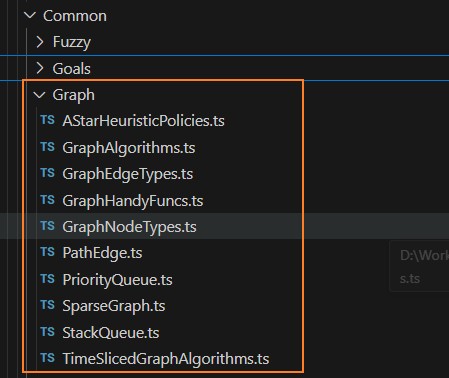
GraphNodeType.ts
包含图节点的实现类。GraphNode是节点基础类,NavGraphNode是导航图节点类,可以在此进一步扩展项目需要的图节点类型。
/**

 * 基础图节点类

 */

@ccclass('GraphNode')

export class GraphNode {

    protected _index; // 节点索引,>= 0

    constructor();

    constructor(idx: number);

    constructor(idx?: number) {

        this._index = idx ?? invalidNodeIndex;

    }


    get index(): number {

        return this._index;

    }

    set index(idx: number) {

        this._index = idx;

    }

    ...

}

/**

 * 导航图用图节点

 */

@ccclass('NavGraphNode')

export class NavGraphNode<T = null> extends GraphNode {

    protected _position: Vec3 = new Vec3(); //节点所在导航图中的坐标

    protected _extraInfo: T = null; // 扩展信息

    constructor();

    constructor(idx: number, pos: Vec3, extraInfo?: T);

    constructor(idx?: number, pos?: Vec3, extraInfo: T = null) {

        super(idx);

        this._position.set(pos ?? Vec3.ZERO);

        this._extraInfo = extraInfo ?? null;

    }


    get pos(): Vec3 {

        return this._position;

    }

    set pos(pos: Vec3) {

        this._position.set(pos);

    }

    get extraInfo(): T {

        return this._extraInfo;

    }

    set extraInfo(info: T) {

        this._extraInfo = info;

    }

    ...

}
GraphEdgeTypes.ts
包含图节点之间连接边的实现类。GraphEdge是连接边基础类,NavGraphEdge是导航图连接边类,可以在此进一步扩展项目需要的图节点连接边类型。
/**

 * 基础图节点连接之边类

 */

@ccclass('GraphEdge')

export class GraphEdge {

    protected _from: number; // 边起始位置的节点索引

    protected _to: number; // 边结束位置的节点索引

    protected _cost: number; // 经过该边的开销

    constructor();

    constructor(from: number, to: number);

    constructor(from: number, to: number, cost: number);

    constructor(from?: number, to?: number, cost?: number) {

        this._from = from ?? invalidNodeIndex;

        this._to = to ?? invalidNodeIndex;

        this._cost = cost ?? 1;

    }

    get from(): number {

        return this._from;

    }

    set from(idx: number) {

        this._from = idx;

    }

    get to(): number {

        return this._to;

    }

    set to(idx: number) {

        this._to = idx;

    }

    get cost(): number {

        return this._cost;

    }

    set cost(newCost: number) {

        this._cost = newCost;

    }

    /**

     * 判断与指定的边,是否是同一个边

     */

    public equal(rhs: GraphEdge) {

        return (rhs._from == this._from) &&

            (rhs._to == this._to) &&

            (rhs._cost == this._cost);

    }

    /**

     * 连接边的小于号比较函数

     */

    public static lessThanFunc(lhs: GraphEdge, rhs: GraphEdge) {

        return lhs.cost < rhs.cost;

    }

}

/**

 * 导航图用图节点连接边类

 */

export class NavGraphEdge extends GraphEdge {

    protected _flags: number = 0; // 边类型标记

    protected _idOfIntersectingEntity: number = -1; //如果边与对象相交(比如门或电梯),则此处存放该对象的id

    constructor();

    constructor(from: number, to: number, cost: number, flags?: number, id?: number)

    constructor(from?: number, to?: number, cost?: number, flags: number = 0, id: number = -1) {

        super(from, to, cost);

        this._flags = flags;

        this._idOfIntersectingEntity = id;

    }

    get flags(): number {

        return this._flags;

    }

    set flags(newFlags: number) {

        this._flags = newFlags;

    }

    get idOfIntersectingEntity(): number {

        return this._idOfIntersectingEntity;

    }

    set idOfIntersectingEntity(id: number) {

        this._idOfIntersectingEntity = id;

    }

}
SparseGraph.ts
SparseGraph实现了稀疏图类型,复用该类型,可以快速产出项目内需要的图对象。
// 稀疏图

@ccclass('SparseGraph')

export class SparseGraph<NodeType extends GraphNode, EdgeType extends GraphEdge> {

    private _nodes: GraphNodeArr<NodeType> = new Array<NodeType>(); // 图节点数组

    private _edges: GraphEdageListArr<EdgeType> = new Array<Array<EdgeType>>(); // 图各节点连接边列表组成的数组

    private _digraph: boolean = false; // 是否为有向图

    private _nextNodeIndex: number = 0; // 下一节点的索引值

    private _nodeFactory: GraphNodeFactory = null; // 节点创建用工厂函数

    private _edgeFactory: GraphEdgeFactory = null; // 连接边创建用工厂函数

    constructor(digraph: boolean, nodeFactory: GraphNodeFactory, edgeFactory: GraphEdgeFactory) {

        this._digraph = digraph;

        this._nextNodeIndex = 0;

        this._nodeFactory = nodeFactory;

        this._edgeFactory = edgeFactory;

    }

    get nodes(): GraphNodeArr<NodeType> {

        return this._nodes;

    }

    get edges(): GraphEdageListArr<EdgeType> {

        return this._edges;

    }

    ...

    // 取得指定索引的节点

    getNode(idx: number): NodeType {

        assert(idx >= 0 && idx < this._nodes.length, `<SparseGraph::GetNode>: invalid index(${idx})`);

        return this._nodes[idx];

    }

    // 取得指定的边数据

    getEdge(from: number, to: number): EdgeType {

        // 索引有效性校验

        assert(from >= 0 && from < this._nodes.length && this._nodes[from].index != invalidNodeIndex,

            `<SparseGraph::GetEdge>: invalid 'from' index(${from})`);

        assert(to >= 0 && to < this._nodes.length && this._nodes[to].index != invalidNodeIndex,

            `<SparseGraph::GetEdge>: invalid 'to' index(${to})`);


        for (let curEdge of this._edges[from]) {

            if (curEdge.to == to) {

                return curEdge;

            }

        }

        assert(false, `<SparseGraph::GetEdge>: edge does not exist, from(${from}) to(${to})`);

        return null;

    }

    // 取得节点对应的边列表

    getNodeEdgeList(idx: number): GraphEdgeList<EdgeType> {

    }

    // 判断图中是否尚不存在指定的边,如果不存在则返回true

    private uniqueEdge(from: number, to: number): boolean {

    }

    // 删除当前图中的所有指向无效节点的边

    private cullInvalidEdges() {

    }

    // 添加新的图节点

    addNode(node: NodeType): number {

    }

    // 删除指定索引的节点

    removeNode(nodeIdx: number) {

    }

    // 添加新的边

    addEdge(edge: EdgeType) {

    }

    // 删除指定边

    removeEdge(from: number, to: number) {

    }

    // 设置边的开销

    setEdgeCost(from: number, to: number, costN: number) {

    }

    // 取得激活的节点数量

    numActiveNodes(): number {

    }

    // 取得边的总数

    numEdges(): number {

    }

    // 校验指定索引的节点是否存在

    isNodePresent(idx: number): boolean {

    }

    // 校验指定边数据是否存在

    isEdgePresent(from: number, to: number): boolean {

    }

    // 清空当前图的所有数据

    clear() {

    }

    // 清空图内的所有边数据

    removeEdges() {

    }

}
GraphAlgorithms.ts
包含图的几种搜索算法,深度优先遍历(GraphSearchDFS)、广度优先遍历(GraphSearchBFS)、Dijkstra搜索算法(GraphSearchDijkstra)、A星寻路算法(GraphSearchAStar),项目内常用Dijkstra、A星寻路算法。
/**

 * 深度优先遍历

 */

@ccclass('GraphSearchDFS')

export class GraphSearchDFS<NodeType extends GraphNode, EdgeType extends GraphEdge> {

    private _graph: SparseGraph<NodeType, EdgeType> = null; // 引用的图

    private _visited: Array<number> = null; // 对应图节点访问与否的标记

    private _route: Array<number> = null; // 节点到父节点的路由,key为节点索引,val为该节点对应的父节点

    private _spanningTree: Array<EdgeType> = []; // 搜索过程中经过的边,组成的tree列表

    private _sourceIdx: number = invalidNodeIndex; // 搜索的起始节点索引

    private _targetIdx: number = invalidNodeIndex; // 搜索的目标节点索引

    private _found: boolean = false; // 是否搜索到了目标节点

    constructor(graph: SparseGraph<NodeType, EdgeType>, sourceIdx: number, targetIdx: number = invalidNodeIndex) {

        ...

    }

    get found(): boolean {

    }

    /**

     * 取得深度遍历搜索过程中的边列表

     */

    getSearchTree(): Array<EdgeType> {

        return this._spanningTree;

    }

    /**

     * 开始深度优先遍历搜索

     */

    search(): boolean {

    }

    /**

     * 取得有起始点到目标点组成的节点索引列表

     */

    getPathToTarget(): Array<number> {

    }

}

/**

 * 广度优先遍历

 */

@ccclass('GraphSearchBFS')

export class GraphSearchBFS<NodeType extends GraphNode, EdgeType extends GraphEdge> {

    private _graph: SparseGraph<NodeType, EdgeType> = null; // 引用的图

    private _visited: Array<number> = null; // 对应图节点访问与否的标记

    private _route: Array<number> = null; // 节点到父节点的路由,key为节点索引,val为该节点对应的父节点

    private _spanningTree: Array<EdgeType> = []; // 搜索过程中经过的边,组成的tree列表

    private _sourceIdx: number = invalidNodeIndex; // 搜索的起始节点索引

    private _targetIdx: number = invalidNodeIndex; // 搜索的目标节点索引

    private _found: boolean = false; // 是否搜索到了目标节点

    constructor(graph: SparseGraph<NodeType, EdgeType>, sourceIdx: number, targetIdx: number = invalidNodeIndex) {

        ...

    }

    get found(): boolean {

    }

    /**

     * 取得广度遍历搜索过程中的边列表

     */

    getSearchTree(): Array<EdgeType> {

        return this._spanningTree;

    }

    /**

     * 开始广度优先遍历搜索

     */

    search(): boolean {

    }

    /**

     * 取得有起始点到目标点组成的节点索引列表

     */

    getPathToTarget(): Array<number> {

    }

}

/**

 * Dijkstra搜索算法

 */

@ccclass('GraphSearchDijkstra')

export class GraphSearchDijkstra<NodeType extends GraphNode, EdgeType extends GraphEdge> {

    private _graph: SparseGraph<NodeType, EdgeType> = null; // 引用的图

    private _shortestPathTree: Array<EdgeType> = null; // 最短路径树

    private _costToThisNode: Array<number> = null; // 到各节点的最短路径消耗

    private _searchFrontier: Array<EdgeType> = null; // 跟SPT相连,但尚未放到SPT的边。每个节点索引,最多只保留一个最优解的边

    private _sourceIdx: number = invalidNodeIndex; // 搜索的起始节点索引

    private _targetIdx: number = invalidNodeIndex; // 搜索的目标节点索引

    constructor(graph: SparseGraph<NodeType, EdgeType>, sourceIdx: number, targetIdx: number = invalidNodeIndex) {

        ...

    }

    /**

     * 重置

     */

    reset(sourceIdx: number, targetIdx: number = invalidNodeIndex) {

    }

    /**

     * 取得最短路径树

     */

    getSPT(): Array<EdgeType> {

    }

    /**

     * 取得到目标节点的总消耗

     */

    getCostToTarget(): number {

    }

    /**

     * 取得到指定节点的总消耗

     */

    getCostToNode(idx: number): number {

        return this._costToThisNode[idx];

    }

    /**

     * 开始Dijkstra搜索

     */

    search() {

    }

    /**

     * 取得有起始点到目标点组成的节点索引列表

     */

    getPathToTarget(): Array<number> {

    }

}

// A星寻路启发处理函数类型

export type AStarHeuristicFunc<NodeType extends GraphNode, EdgeType extends GraphEdge> =

    (graph: SparseGraph<NodeType, EdgeType>, idx1: number, idx2: number) => number;

/**

 * A星寻路算法

 */

@ccclass('GraphSearchAStar')

export class GraphSearchAStar<NodeType extends GraphNode, EdgeType extends GraphEdge> {

    private _graph: SparseGraph<NodeType, EdgeType> = null; // 引用的图

    private _shortestPathTree: Array<EdgeType> = null; // 最短路径树

    private _searchFrontier: Array<EdgeType> = null; // 跟SPT相连,但尚未放到SPT的边。每个节点索引,最多只保留一个最优解的边

    private _GCostToThisNode: Array<number> = null; // 到各节点的最短路径消耗

    private _FCostToThisNode: Array<number> = null; // 到各节点的最短路径消耗 + (各节点与目标节点,通过启发处理计算后的消耗) = 总值

    private _sourceIdx: number = invalidNodeIndex; // 搜索的起始节点索引

    private _targetIdx: number = invalidNodeIndex; // 搜索的目标节点索引

    private _heuristicFunc: AStarHeuristicFunc<NodeType, EdgeType> = null; // 启发处理函数

    constructor(graph: SparseGraph<NodeType, EdgeType>,

        heuristicFunc: AStarHeuristicFunc<NodeType, EdgeType>,

        sourceIdx: number, targetIdx: number)

    {

        ...

    }

    /**

     * 取得最短路径树

     */

    getSPT(): Array<EdgeType> {

    }

    /**

     * 取得到目标节点的总消耗

     */

    getCostToTarget(): number {

    }

    /**

     * 开始A星搜索

     */

    search() {

    }

    /**

     * 取得有起始点到目标点组成的节点索引列表

     */

    getPathToTarget(): Array<number> {

    }

}
TimeSlicedGraphAlgorithms.ts
包含Dijkstra、A星寻路算法的时间片实现版。在处理大量寻路请求时,通过时间片处理,可以将多个寻路请求分化到多帧处理,避免游戏卡顿。资源内的Raven游戏,提供了时间片算法使用的例子。
/**

 * 时间片路径搜索的状态枚举

 */

export enum TimeSlicedSearchState {

    searIncomplete, // 搜索尚未完成

    targetFound, // 已经发现目标

    targetNotFound, // 未发现目标

}

/**

 * 搜索算法种类

 */

export enum TimeSlicedSearchType {

    AStar, // A星寻路

    Dijkstra, // Dijkstra算法

}

/**

 * 时间片搜索算法基类

 */

@ccclass('GraphSearchTimeSliced')

export abstract class GraphSearchTimeSliced<EdgeType> {

    private _searchType: TimeSlicedSearchType = null; // 搜索类型

    constructor(searchType: TimeSlicedSearchType) {

        this._searchType = searchType;

    }

    get searchType(): TimeSlicedSearchType {

        return this._searchType;

    }

    /**

     * 取得目标索引

     */

    abstract targetIdx(): number;

    /**

     * 单步搜索

     */

    abstract cycleOnce(): TimeSlicedSearchState;

    /**

     * 取得搜索树

     */

    abstract getSPT(): Array<EdgeType>;

    /**

     * 返回到目标点的消耗

     */

    abstract getCostToTarget(): number;

    /**

     * 取得到达目标的节点索引列表

     */

    abstract getPathToTarget(): Array<number>;

    /**

     * 取得到达目标的路径

     */

    abstract getPathAsPathEdges(): Array<PathEdge>;

}

/**

 * 时间片实现:A星寻路算法

 */

@ccclass('GraphSearchAStarTS')

export class GraphSearchAStarTS<NodeType extends GraphNode, EdgeType extends GraphEdge>

    extends GraphSearchTimeSliced<EdgeType>

{

    private _graph: SparseGraph<NodeType, EdgeType> = null; // 引用的图

    private _shortestPathTree: Array<EdgeType> = null; // 最短路径树

    private _searchFrontier: Array<EdgeType> = null; // 跟SPT相连,但尚未放到SPT的边。每个节点索引,最多只保留一个最优解的边

    private _GCostToThisNode: Array<number> = null; // 到各节点的最短路径消耗

    private _FCostToThisNode: Array<number> = null; // 到各节点的最短路径消耗 + (各节点与目标节点,通过启发处理计算后的消耗) = 总值

    private _sourceIdx: number = invalidNodeIndex; // 搜索的起始节点索引

    private _targetIdx: number = invalidNodeIndex; // 搜索的目标节点索引

    private _heuristicFunc: AStarHeuristicFunc<NodeType, EdgeType> = null; // 启发处理函数

    private _pq: IndexPriorityQueue<number> = null; // 搜索用索引优先队列

    constructor(graph: SparseGraph<NodeType, EdgeType>,

        heuristicFunc: AStarHeuristicFunc<NodeType, EdgeType>,

        sourceIdx: number, targetIdx: number)

    {

        ...

    }

    /**

     * 取得目标索引

     */

    targetIdx(): number {

    }

    /**

     * 取得最短路径树

     */

    getSPT(): Array<EdgeType> {

    }

    /**

     * 取得到目标节点的总消耗

     */

    getCostToTarget(): number {

    }

    /**

     * 开始A星搜索

     */

    cycleOnce(): TimeSlicedSearchState {

    }

    /**

     * 取得有起始点到目标点组成的节点索引列表

     */

    getPathToTarget(): Array<number> {

    }

    /**

     * 取得到达目标的路径

     */

    getPathAsPathEdges(): Array<PathEdge> {

    }

}

// Dijkstra算法终止条件判定函数类型

export type DijkstraStopConditionFunc<NodeType extends GraphNode, EdgeType extends GraphEdge> =

    (graph: SparseGraph<NodeType, EdgeType>, target: number, curNodeIdx: number) => boolean;

/**

 * 时间片实现:Dijkstra搜索算法

 */

@ccclass('GraphSearchDijkstraTS')

export class GraphSearchDijkstraTS<NodeType extends GraphNode, EdgeType extends GraphEdge>

    extends GraphSearchTimeSliced<EdgeType>

{

    private _graph: SparseGraph<NodeType, EdgeType> = null; // 引用的图

    private _shortestPathTree: Array<EdgeType> = null; // 最短路径树

    private _costToThisNode: Array<number> = null; // 到各节点的最短路径消耗

    private _searchFrontier: Array<EdgeType> = null; // 跟SPT相连,但尚未放到SPT的边。每个节点索引,最多只保留一个最优解的边

    private _sourceIdx: number = invalidNodeIndex; // 搜索的起始节点索引

    private _targetIdx: number = invalidNodeIndex; // 搜索的目标节点索引

    private _stopConditionFunc: DijkstraStopConditionFunc<NodeType, EdgeType> = null; // 终止条件判定函数

    private _pq: IndexPriorityQueue<number> = null; // 搜索用索引优先队列

    constructor(graph: SparseGraph<NodeType, EdgeType>,

        stopConditionFunc: DijkstraStopConditionFunc<NodeType, EdgeType>,

        sourceIdx: number, targetIdx: number = invalidNodeIndex)

    {

        ...

    }

    /**

     * 取得目标索引

     */

    targetIdx(): number {

    }

    /**

     * 取得最短路径树

     */

    getSPT(): Array<EdgeType> {

    }

    /**

     * 取得到目标节点的总消耗

     */

    getCostToTarget(): number {

    }

    /**

     * 取得到指定节点的总消耗

     */

    getCostToNode(idx: number): number {

    }

    /**

     * 开始Dijkstra搜索

     */

    cycleOnce(): TimeSlicedSearchState {

    }

    /**

     * 取得有起始点到目标点组成的节点索引列表

     */

    getPathToTarget(): Array<number> {

    }

    /**

     * 取得到达目标的路径

     */

    getPathAsPathEdges(): Array<PathEdge> {

    }

}
GraphHandyFuncs.ts
GraphHandyFuncs类包含图对象相关辅助函数,其中createGridByFloodFill接口,通过洪水填充算法,可以动态生成项目内需要的导航图信息。
/**

 * 图对象用辅助函数类

 */

@ccclass('GraphHandyFuncs')

export class GraphHandyFuncs {

    //禁止生成实例对象

    private constructor() {}

    /**

     * 校验是否是图内有效的邻居节点

     */

    public static validNbr(x: number, y: number, numCellsX: number, numCellsY: number): boolean {

    }

    /**

     * 辅助创建网格布局中的图形节点的8条相邻边

     */

    public static Helper_AddNbrEdgesToGridNode<T, NodeType extends NavGraphNode<T>, EdgeType extends GraphEdge>

        (graph: SparseGraph<NodeType, EdgeType>, row: number, col: number, numCellsX: number, numCellsY: number)

    {

    }

    /**

     * 辅助创建网格布局中的图(节点顺序从左上到右下)

     */

    public static Helper_CreateGrid<T, NodeType extends NavGraphNode<T>, EdgeType extends GraphEdge>

        (graph: SparseGraph<NodeType, EdgeType>, gridWidth: number, gridHeight: number,

        numCellsX: number, numCellsY: number, gridStartX: number, gridStartY: number)

    {

    }

    /**

     * 辅助绘制网格布局中的图

     */

    public static Helper_DrawGrid<T, NodeType extends NavGraphNode<T>, EdgeType extends GraphEdge>

        (graphics: Graphics, graph: SparseGraph<NodeType, EdgeType>, color: math.Color = new math.Color('E0E3DA'))

    {

    }

    /**

     * 指定导航图的节点,根据连接边的长度、指定权重值,设置连接边的消耗值。常用设置地形成本

     */

    public static weightNavGraphNodeEdges<T, NodeType extends NavGraphNode<T>, EdgeType extends GraphEdge>

        (graph: SparseGraph<NodeType, EdgeType>, nodeIdx: number, weight: number)

    {

    }

    /**

     * 计算导航图中连接边的平均长度,使用节点间的实际长度,而不是cost来计算

     */

    public static calcNavGraphEdgesAverLength<T, NodeType extends NavGraphNode<T>, EdgeType extends GraphEdge>

        (graph: SparseGraph<NodeType, EdgeType>): number

    {

    }

    /**

     * 创建从一个节点到其他所有节点的消耗成本的对照表

     */

    public static createAllPairsCostsTable<NodeType extends GraphNode, EdgeType extends GraphEdge>

        (graph: SparseGraph<NodeType, EdgeType>): Array<Array<number>>

    {

    }

    /**

     * 取得图里消耗最大的连接边

     */

    public static getCostliestGraphEdge<NodeType extends GraphNode, EdgeType extends GraphEdge>

        (graph: SparseGraph<NodeType, EdgeType>): EdgeType

    {

    }

    /**

     * 洪水填充算法,构建导航图数据

     */

    public static createGridByFloodFill<T, NodeType extends NavGraphNode<T>, EdgeType extends GraphEdge>

        (graph: SparseGraph<NodeType, EdgeType>, firstNodePos: Vec3, edgeLen: number, extraLen: number, wallPrefArr: Array<WallPref>)

    {

        let catchPos2NodeMap = new Map<string, NodeType>();

        let waitHandlePosQueue = new StackQueue<Vec3>();

        // 第一个节点先入队列

        [firstNodePos.x, firstNodePos.y] = [Math.floor(firstNodePos.x), Math.floor(firstNodePos.y)];

        let newNode = graph.nodeFactory(graph.nextFreeNodeIndex, {pos: firstNodePos});

        graph.addNode(newNode as NodeType);

        let cposKey = `${firstNodePos.x}_${firstNodePos.y}`;

        catchPos2NodeMap.set(cposKey, newNode as NodeType);

        waitHandlePosQueue.push(firstNodePos.clone());

        // 依次处理队列中的节点信息

        while (!waitHandlePosQueue.empty()) {

            // 将队首节点可连接的节点,添加进图

            let handlePos = waitHandlePosQueue.pop();

            let connectPosList = this.getConnectEdgeNodePosList(handlePos, edgeLen);

            for (let cpos of connectPosList) {

                // 排除跟墙壁相交的点

                if (this.checkEdgeCrossWall(handlePos, cpos, extraLen, wallPrefArr)) continue;

                // 添加节点

                cposKey = `${cpos.x}_${cpos.y}`;

                let isNewPos = !catchPos2NodeMap.has(cposKey);

                if (isNewPos) {

                    newNode = graph.nodeFactory(graph.nextFreeNodeIndex, {pos: cpos});

                    graph.addNode(newNode as NodeType);

                    catchPos2NodeMap.set(cposKey, newNode as NodeType);

                    waitHandlePosQueue.push(cpos.clone());

                }

                // 添加边

                let handleKey = `${handlePos.x}_${handlePos.y}`;

                let handleNode = catchPos2NodeMap.get(handleKey);

                let cposNode = catchPos2NodeMap.get(cposKey);

                if (!graph.isEdgePresent(handleNode.index, cposNode.index)) {

                    let dist = Vec3.distance(handlePos, cpos);

                    let newEdge = graph.edgeFactory(handleNode.index, cposNode.index, dist);

                    graph.addEdge(newEdge as EdgeType);

                }

            }

        }

    }

    /**

     * 取得跟指定节点相连接的8个边节点的坐标数据

     */

    private static _edgeNodePosList:Array<Vec3> = null;

    private static getConnectEdgeNodePosList(nodePos: Vec3, edgeLen: number): Array<Vec3> {

    }

    /**

     * 检测导航图边是否与墙壁相交

     */

    private static _checkEdgeCrossBox: geometry.AABB = new AABB();

    private static _checkEdgeCrossMid: Vec3 = new Vec3();

    private static checkEdgeCrossWall(from: Vec3, to: Vec3, extraLen: number, wallPrefArr: Array<WallPref>): boolean {

    }

}
AStarHeuristicPolicies.ts
包含A星寻路算法经常使用到的,各类启发因子函数的实现类。
/**

 * A星启发因子:欧几里得距离

 */

@ccclass('AStarHeuristic_Euclid')

export class AStarHeuristic_Euclid {

    private constructor() {}

    public static calculate<NodeType extends NavGraphNode, EdgeType extends GraphEdge>

        (graph: SparseGraph<NodeType, EdgeType>, idx1: number, idx2: number): number

    {

        return Vec3.distance(graph.getNode(idx1).pos, graph.getNode(idx2).pos);

    }

}

/**

 * A星启发因子:欧几里得距离,增加一定量的噪声

 */

@ccclass('AStarHeuristic_NoisyEuclid')

export class AStarHeuristic_NoisyEuclid {

    private constructor() {}

    public static calculate<NodeType extends NavGraphNode, EdgeType extends GraphEdge>

        (graph: SparseGraph<NodeType, EdgeType>, idx1: number, idx2: number): number

    {

        return Vec3.distance(graph.getNode(idx1).pos, graph.getNode(idx2).pos) * Util.getRandomFloat(0.9, 1.1);

    }

}

/**

 * A星启发因子:Dijkstra

 */

@ccclass('AStarHeuristic_Dijkstra')

export class AStarHeuristic_Dijkstra {

    private constructor() {}

    public static calculate<NodeType extends GraphNode, EdgeType extends GraphEdge>

        (graph: SparseGraph<NodeType, EdgeType>, idx1: number, idx2: number): number

    {

        return 0;

    }

}

/**

 * A星启发因子:曼哈顿距离

 */

@ccclass('AStarHeuristic_Manhat')

export class AStarHeuristic_Manhat {

    private constructor() {}

    // 适合上下左右,四方向移动

    public static calculate<NodeType extends NavGraphNode, EdgeType extends GraphEdge>

        (graph: SparseGraph<NodeType, EdgeType>, idx1: number, idx2: number): number

    {

        let pos1 = graph.getNode(idx1).pos;

        let pos2 = graph.getNode(idx2).pos;

        return Math.abs(pos1.x - pos2.x) + Math.abs(pos1.y - pos2.y);

    }

}

/**

 * A星启发因子:对角线距离

 */

@ccclass('AStarHeuristic_Diagonal')

export class AStarHeuristic_Diagonal {

    private constructor() {}

    // 适合上、下、左、右、左上、右上、左下、右下,8方向移动,对角线移动消耗更多

    public static calculate<NodeType extends NavGraphNode, EdgeType extends GraphEdge>

        (graph: SparseGraph<NodeType, EdgeType>, idx1: number, idx2: number): number

    {

        let pos1 = graph.getNode(idx1).pos;

        let pos2 = graph.getNode(idx2).pos;

        let dx = Math.abs(pos1.x - pos2.x);

        let dy = Math.abs(pos1.y - pos2.y);

        return 10 * (dx + dy) - 6 * Math.min(dx, dy);

    }

}

/**

 * A星启发因子:切比雪夫距离

 */

@ccclass('AStarHeuristic_Chebyshev')

export class AStarHeuristic_Chebyshev {

    private constructor() {}

    // 适合上、下、左、右、左上、右上、左下、右下,8方向移动,且各方向移动消耗相同

    public static calculate<NodeType extends NavGraphNode, EdgeType extends GraphEdge>

        (graph: SparseGraph<NodeType, EdgeType>, idx1: number, idx2: number): number

    {

        let pos1 = graph.getNode(idx1).pos;

        let pos2 = graph.getNode(idx2).pos;

        let dx = Math.abs(pos1.x - pos2.x);

        let dy = Math.abs(pos1.y - pos2.y);

        return Math.max(dx, dy);

    }

}
路径规划
PathManager、RavenPathPlanner类,被用于Raven游戏里面的路径规划管理,与时间片Dijkstra、A星寻路算法配合使用。虽然类内部设计是为Raven游戏内bot智能体所使用,但是经过简单修改,就可以用到自己的项目中。在处理大量寻路请求时,可以达到理想效果。
/**

 * 统一调配所有路径规划实例

 */

@ccclass('PathManager')

export class PathManager {

    private _searchRequests: Array<RavenPathPlanner> = []; // 所有请求搜索计划的列表

    private _searchTimePerUpdate: number = 0; // 每次更新搜索时,最多占用的时间 ms

    constructor(timeRatio: number) {

        // 路径规划耗时占当前帧率时间的比例

        if (timeRatio < 0.1) timeRatio = 0.1;

        if (timeRatio > 0.5) timeRatio = 0.5;

        let costTime = 1000 / (game.frameRate as number) * timeRatio;

        this._searchTimePerUpdate  = Math.max(1, costTime);

        console.log(`PathManager searchTimePerUpdate ${costTime} ms`);

    }

    /**

     * 更新当前搜索路径列表

     */

    updateSearchs() {

        ...

    }

    /**

     * 注册新的搜索计划

     */

    register(pathPlanner : RavenPathPlanner) {

    }

    /**

     * 注销指定的搜索计划

     */

    unRegister(pathPlanner : RavenPathPlanner) {

    }

    /**

     * 返回路径规划总量

     */

    getActiveSearchesCount(): number {

    }

}

/**

 * Bot使用的路径规划类

 */

@ccclass('RavenPathPlanner')

export class RavenPathPlanner {

    private _owner: RavenBot = null; // 实例所属Bot

    private _graph: RavenSparseGraph = null; // 导航图

    private _curSearch: GraphSearchTimeSliced<RavenGraphEdge> = null; // 对应搜索算法实例

    private _destPos: Vec3 = new Vec3(); // 目标点位置

    constructor(owner: RavenBot) {

        ...

    }

    /**

     * 取得距离指定位置最近的节点索引

     */

    private getClosestNodeToPositon(pos: Vec3): number {

    }

    /**

     * 快速去除多余边来优化路径

     */

    private smoothPathEdgesQuick(path: Array<PathEdge>) {

    }

    /**

     * 精确去除多余边来优化路径

     */

    private smoothPathEdgesPrecise(path: Array<PathEdge>) {

    }

    /**

     * 为新的搜索做准备工作

     */

    private getReadyFroNewSearch() {

    }

    /**

     * 走一遍查找,根据查找结果,触发不同的消息

     */

    cycleOnce(): TimeSlicedSearchState {

    }

    /**

     * 取得路径中所有边信息

     */

    getPath(): Array<PathEdge> {

    }

    /**

     * 计算bot从当前位置,到达指定索引的节点,总消耗成本

     */

    getCostToNode(idx: number): number {

    }

    /**

     * 返回与给定类型实例最接近的实例的成本

     */

    getCostToClosestItem(giverType: number): number {

    }

    /**

     * Dij停止判定函数

     */

    public static dijkstraStopConditionFunc(graph: RavenSparseGraph, target: number, curNodeIdx: number): boolean {

    }

    /**

     * 请求创建到指定类型道具的路径,异步创建

     */

    requestPathToItem(itemType: number): boolean {

    }

    /**

     * 请求创建到目标位置的路径,异步创建

     */

    requestPathToPos(targetPos: Vec3): boolean {

    }

    /**

     * 取得指定索引的节点对应的位置

     */

    getNodePos(idx: number): Vec3 {

    }

}
目标驱动
资源script/Common/Goals文件夹内,包含了目标驱动使用的基类。目标驱动使用组合设计模式(Composite),Goal、GoalComposite类分别是对单元目标、复合目标的抽象基类。
script/Chapter7_10_Raven/goals文件夹内,包含大量各种目标类型的实现,其中GoalThink类充当了智能体大脑的功能,用于各类目标的仲裁判定。对于目标驱动的使用,可以参考此处的逻辑。
/**

 * 目标类型的基类

 */

@ccclass('Goal')

export abstract class Goal<T> {

    protected _type: number = -1; // 目标类型

    protected _owner: T = null; // 对拥有该目标的实体的引用

    protected _state: Goal_State = Goal_State.inactive; // 目标当前状态

    constructor(entity: T, type: number) {

        this._owner = entity;

        this._type = type;

        this._state = Goal_State.inactive;

    }

    get type(): number {

        return this._type;

    }

    /**

     * 激活目标处理

     */

    abstract activate();

    /**

     * 更新目标处理

     */

    abstract process(): Goal_State;

    /**

     * 终止目标处理

     */

    abstract terminate();

    /**

     * 渲染目标信息

     */

    render() {

    }

    /**

     * 处理消息

     */

    handleMessage(msg: Telegram): boolean {

        return false;

    }

    /**

     * 增加子目标。该接口默认报错,复合目标会重写该接口

     */

    addSubgoal(g: Goal<T>) {

        throw new Error(`Cannot add goals to atomic goals`);

    }

    /**

     * 判断目标状态情况的系列接口

     */

    isComplete(): boolean {

        return this._state == Goal_State.completed;

    }

    isActive(): boolean {

        return this._state == Goal_State.active;

    }

    isInactive(): boolean {

        return this._state == Goal_State.inactive;

    }


    hasFailed(): boolean {

        return this._state == Goal_State.failed;

    }

    /**

     * 如果尚未激活,则调用目标的激活处理接口

     */

    protected activateIfInactive() {

        if (this.isInactive()) {

            this.activate();

        }

    }

    /**

     * 如果目标失败了,则设置状态为未激活状态,如此下一帧处理时会自动调用激活接口

     */

    protected reactivateIfFailed() {

        if (this.hasFailed()) {

            this._state = Goal_State.inactive;

        }

    }

}
/**

 * 复合目标的基类

 */

@ccclass('GoalComposite')

export abstract class GoalComposite<T> extends Goal<T> {

    protected _subGoals: Array<Goal<T>> = [];

    constructor(entity: T, type: number) {

        super(entity, type);

    }

    get frontSubGoal(): Goal<T>|undefined {

        return this._subGoals[this._subGoals.length - 1];

    }

    /**

     * 处理子目标

     */

    protected processSubgoals(): Goal_State {

        // 清理完成、失败的目标

        while (this._subGoals.length > 0 &&

            (this._subGoals[this._subGoals.length - 1].isComplete() || this._subGoals[this._subGoals.length - 1].hasFailed()))

        {

            this._subGoals[this._subGoals.length - 1].terminate();

            this._subGoals.pop();

        }

        // 处理最新的目标

        if (this._subGoals.length > 0) {

            let state = this._subGoals[this._subGoals.length - 1].process();

            // 虽然该子目标完成了,但若还有其他子目标,状态需返回为active,以备之后继续处理后面的目标

            if (state == Goal_State.completed && this._subGoals.length > 1) {

                return Goal_State.active;

            }

            return state;

        } else {

            return Goal_State.completed;

        }

    }


    /**

     * 传递消息给子目标

     */

    protected forwardMsgToSubgoal(msg: Telegram): boolean {

        if (this._subGoals.length > 0) {

            return this._subGoals[this._subGoals.length - 1].handleMessage(msg);

        }

        return false;

    }

    /**

     * 处理消息

     */

    handleMessage(msg: Telegram): boolean {

        return this.forwardMsgToSubgoal(msg);

    }

    /**

     * 添加子目标

     */

    addSubgoal(g: Goal<T>) {

        this._subGoals.push(g);

    }

    /**

     * 终止目标处理

     */

    terminate() {

        this.removeAllSubgoals();

    }

    /**

     * 清空所有子目标

     */

    removeAllSubgoals() {

        for (let i = this._subGoals.length - 1; i >= 0; --i) {

            this._subGoals[i].terminate();

        }

        this._subGoals.length = 0;

    }

    /**

     * 渲染目标信息

     */

    render() {

        if (this._subGoals.length > 0) {

            this._subGoals[this._subGoals.length - 1].render();

        }

    }

}
// 目标驱动的大脑

@ccclass('GoalThink')

export class GoalThink extends GoalComposite<RavenBot> {

    private _evaluators: Array<GoalEvaluator<RavenBot>> = []; // 所有评估目标的列表

    constructor(bot: RavenBot) {

        super(bot, RavenGoalType.goal_think);

        // bot性格偏差随机值范围

        const biasMin = 0.5;

        const biasMax = 1.5;

        // 添加各评估目标

        this._evaluators.push(new ExploreEvaluator(Util.getRandomFloat(biasMin, biasMax)));

        this._evaluators.push(new PickHealthEvaluator(Util.getRandomFloat(biasMin, biasMax)));

        this._evaluators.push(new AttackTargetEvaluator(Util.getRandomFloat(biasMin, biasMax)));

        this._evaluators.push(new PickWeaponEvaluator(Util.getRandomFloat(biasMin, biasMax), RavenEntityType.type_shotgun));

        this._evaluators.push(new PickWeaponEvaluator(Util.getRandomFloat(biasMin, biasMax), RavenEntityType.type_rail_gun));

        this._evaluators.push(new PickWeaponEvaluator(Util.getRandomFloat(biasMin, biasMax), RavenEntityType.type_rocket_launcher));

    }

    get evaluators(): Array<GoalEvaluator<RavenBot>> {

        return this._evaluators;

    }

    /**

     * 激活目标处理

     */

    activate() {

        this._state = Goal_State.active;

        if (!this._owner.isPossessed) {

            this.arbitrate();

        }

    }

    /**

     * 更新目标处理

     */

    process(): Goal_State {

        this.activateIfInactive();

        let subState = this.processSubgoals();

        if (subState == Goal_State.completed || subState == Goal_State.failed) {

            if (!this._owner.isPossessed) {

                // 成功或失败后,重新评估

                this._state = Goal_State.inactive;

            }

        }

        return this._state;

    }

    /**

     * 终止目标处理

     */

    terminate() {

        super.terminate();

    }

    /**

     * 评估后确定当前的目标

     */

    arbitrate() {

        let bestDesirability = 0;

        let bestEvaluator: GoalEvaluator<RavenBot> = null;

        for (let evaluator of this._evaluators) {

            let desirability = evaluator.calcDesirability(this._owner);

            if (desirability > bestDesirability) {

                bestDesirability = desirability;

                bestEvaluator = evaluator;

            }

        }

        assert(!!bestEvaluator, "<GoalThink::arbitrate>: no evaluator selected");

        bestEvaluator.setGoal(this._owner);

    }

    /**

     * 判断给定目标类型是不是最新的目标

     */

    notPresent(goalType: RavenGoalType): boolean {

        if (this._subGoals.length > 0) {

            return this._subGoals[this._subGoals.length - 1].type != goalType;

        }

        return true;

    }


    /**

     * 添加获取指定道具的目标

     */

    addPickItemGoal(itemType: number) {

        if (this.notPresent(itemType2GoalType[itemType])) {

            this.removeAllSubgoals();

            this.addSubgoal(new GoalPickItem(this._owner, itemType));

        }

    }

    /**

     * 添加移动到指定位置的目标

     */

    addMoveToPosGoal(pos: Vec3) {

        this.addSubgoal(new GoalMoveToPosition(this._owner, pos));

    }

    /**

     * 添加探索地图的目标

     */

    addExploreGoal() {

        if (this.notPresent(RavenGoalType.goal_explore)) {

            this.removeAllSubgoals();

            this.addSubgoal(new GoalExplore(this._owner));

        }

    }

    /**

     * 添加攻击对象的目标

     */

    addAttackTargetGoal() {

        if (this.notPresent(RavenGoalType.goal_attack_target)) {

            this.removeAllSubgoals();

            this.addSubgoal(new GoalAttackTarget(this._owner));

        }

    }

    /**

     * 添加移动到指定位置的目标到子目标列表的最前面

     */

    queueMoveToPosGoal(pos: Vec3) {

        this._subGoals.splice(0, 0, new GoalMoveToPosition(this._owner, pos));

    }

    /**

     * 渲染目标信息

     */

    render() {

        for (let goal of this._subGoals) {

            goal.render();

        }

    }

}
触发器
资源script/Common/Triggers文件夹内,包含了游戏内常用触发器的实现类。通过继承这些类,可以实现项目内需要的各类触发器行为。
-
TriggerSystem < T>类,指定类型T对应触发器的管理系统,管理所有T类型相关的触发器。Raven游戏内,地图RavenMap对象,包含了该类的实例。
-
Trigger < T>类,触发器类型的抽象基类
-
TriggerLimitedLifeTime < T>类,有生命时长的触发器类型的抽象基类。Raven游戏内的武器声音传播触发器,是其子类实现。
-
TriggerRespawning < T>类,可在失活一定时间后,自动激活的触发器类型的抽象基类。Raven游戏内的回血道具触发器,是其子类实现。
-
TriggerRegionCircle、TriggerRegionRectangle类,触发器使用的圆型、方形触发区域类。
模糊逻辑
Raven游戏使用模糊逻辑,来选择当前最适合的武器。模糊逻辑可以被应用在游戏的方方面面,比如选择合适的释放技能种类、选择合适的态度面对敌对势力、选择适合当前的发展方向等等。
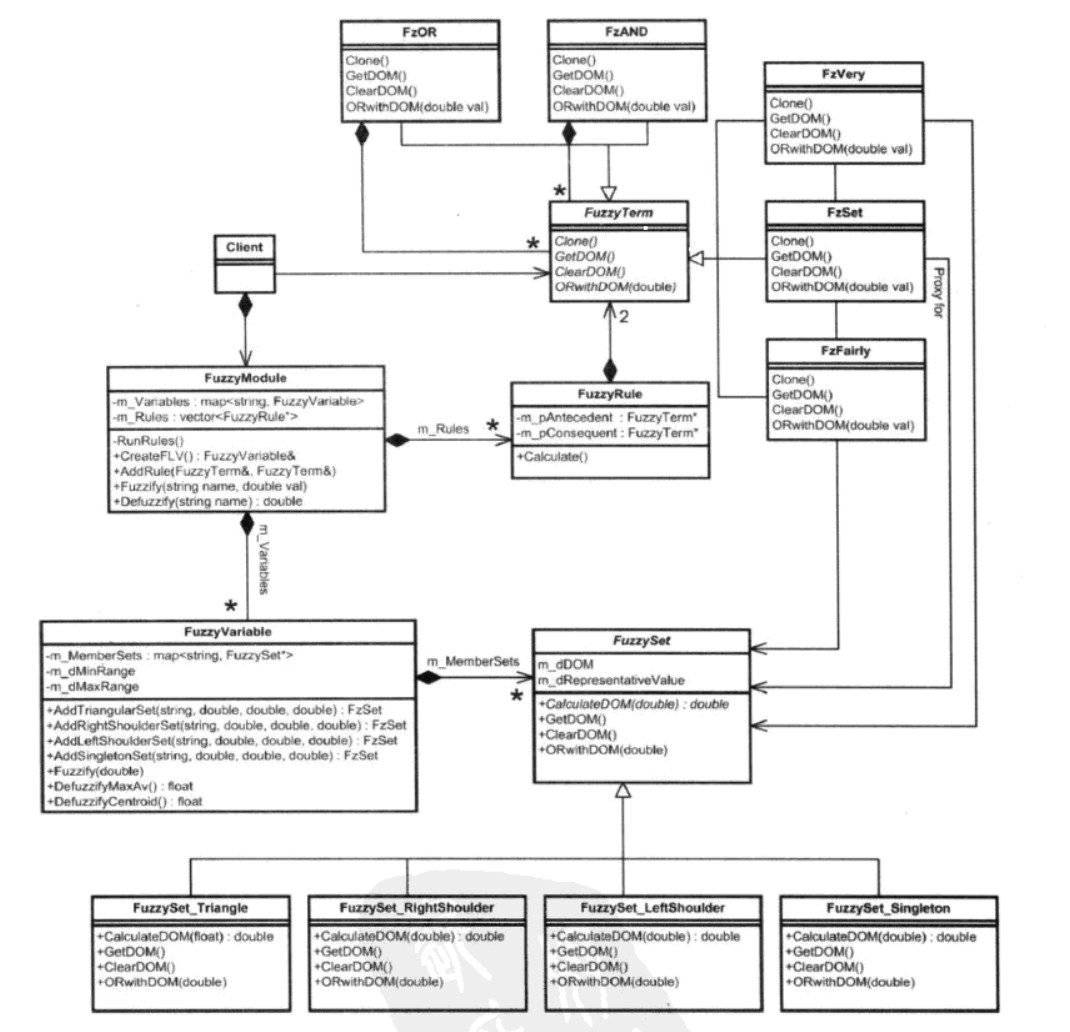
资源script/Common/Fuzzy文件夹内,包含了模糊逻辑实现中常用的类型。
-
FuzzyModule类是模糊逻辑的总控制室,用于模糊处理、去模糊化。为项目内需要模糊逻辑的实体,创建一个该类型的实例。
-
FuzzyVariable类是模糊语言变量类,包含需要用到的模糊集合列表。
-
FuzzySet、FuzzySetTriangle、FuzzySetSingleton、FuzzySetLeftShoulder、FuzzySetRightShoulder是各种类型的模糊集合类
-
FuzzyTerm类是模糊条件的基类,抽象出了作为操作数、运算符都需要实现的接口
-
FzVery、FzFairyly是模糊规则用操作数类型
-
FzAND、FzOR是模糊规则用运算符类型
-
FzSet类是模糊集合的代理
-
FuzzyRule类是模糊规则类,包含模糊规则需要的条件和结果
资源script/Chapter7_10_Raven/armory文件夹内,包含了智能体怎么使用模糊逻辑,选择合适武器的实现代码,可用于模糊逻辑的使用参考。
本项目已在 Cocos Store 上架,您可以通过以下链接购买获取全部完整源码与工程文件。
为什么选择购买而非自己从头实现?
我们理解每一位开发者都有动手实现的冲动。但如果您正致力于实际项目开发或希望高效学习,本项目将成为您的终极加速器:
-
节省大量时间:本项目包含10+个核心AI案例,从环境配置到完美移植,自己实现需要耗费数周甚至数月的业余时间。而您只需一顿饭的费用(现仅需50元),即可立即获得所有这些时间,投入到更重要的创意工作中去。
-
获得最佳实践:这不仅仅是一份代码,更是一个高质量、可复用的代码库。您从中学习到的Cocos工程架构、TypeScript设计和算法实现方式,价值远超定价。
-
投资未来:您的支持将直接帮助开发者(也就是我)持续进行维护更新,并投入到新游戏的研发中。您不仅是购买一个产品,更是在支持一位独立开发者的梦想。
限时优惠:感谢Cocos官方推荐,特此推出限时优惠价(现价49.8元,原价99元),优惠将持续到8月31日。如果您需要,现在就是最好的入手时机。
Cocos官方推荐文章链接

 ,休息时间学习一下