
因为业务需要,需要把所有导入的图片的TrimType修改为noen,请问有没有什么快速的好办法。求教。
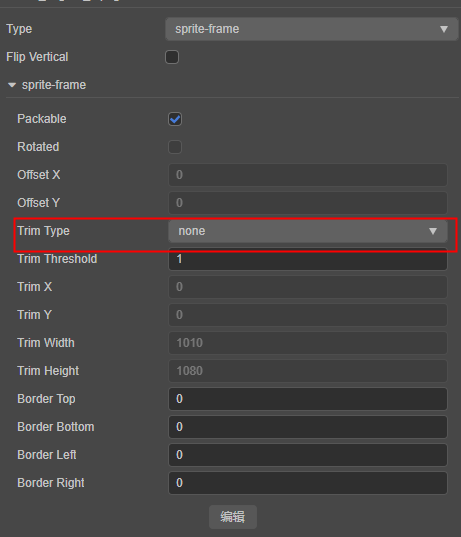
写脚本修改meta文件
为什么不 trim?为了做 UV 动画?
其实更大一点:打包后,客户可以替换图片(还有个修改的图片大小不一样的问题,在想办法中)。目前发现,如果trim了,在播放序列帧的时候,会导致显示不正确。
序列帧代码如下:
import { Animation, AnimationClip, Component, Enum, Sprite, SpriteFrame, UITransform, _decorator } from "cc";

const { ccclass, property } = _decorator;

@ccclass("FrameAnimationData")
class FrameAnimationData {
    @property
    readonly animationName: string = "";
    @property([SpriteFrame])
    readonly spriteFrames: SpriteFrame[] = [];
    @property({ tooltip: "动画帧率,单位为帧/秒。注意此属性仅用于编辑器动画编辑。" })
    readonly sample: number = 10;
    @property({ type: Enum(AnimationClip.WrapMode) })
    readonly wrapMode = AnimationClip.WrapMode.Normal;
}
@ccclass('FrameAnimation')
export class FrameAnimation extends Component {
    @property([FrameAnimationData])
    readonly frameAnimationData: FrameAnimationData[] = [];
    @property
    readonly awakePlayIndex: number = -1;
    @property({ tooltip: "是否在所有动画最后增加一个空白帧。" })
    readonly hasEndEmptyFrame: boolean = true;

    private animation: Animation;
    onLoad() {
        this.initialize();
    }

    private initialize(): void {
        let sprite = this.getOrAddComponent(Sprite);
        sprite.sizeMode = Sprite.SizeMode.RAW;
        sprite.trim = false;
        let uitransform = sprite.getComponent(UITransform);

        this.animation = this.getOrAddComponent(Animation);
        for (let data of this.frameAnimationData) {
            // let atlas = await new Promise<SpriteAtlas>(resolve => resources.load(data.frameAtlasPath, SpriteAtlas, (error, asset) => resolve(asset)));
            let spriteFrames: SpriteFrame[] = data.spriteFrames;
            if (spriteFrames.length > 0) {
                uitransform.setContentSize(spriteFrames[0].width, spriteFrames[1].height);
                if (this.hasEndEmptyFrame)
                    spriteFrames.push(new SpriteFrame());
            }

            let clip = AnimationClip.createWithSpriteFrames(spriteFrames, data.sample);
            clip.name = data.animationName;
            let state = this.animation.createState(clip, data.animationName);
            state.wrapMode = data.wrapMode;
        }

        if (this.awakePlayIndex != -1)
            this.play(this.frameAnimationData[0].animationName);
    }

    public play(animationName?: string, onCompleted?: () => void, thisArg?: any): void {
        if (animationName) {
            this.animation.play(animationName);
        } else {
            this.animation.play(this.frameAnimationData[0].animationName);
        }
        if (onCompleted) this.animation.once(Animation.EventType.STOP, onCompleted, thisArg);
    }
}
从代码上看不出问题所在。估计是别的原因吧。
请问一下,在编辑器中,可以写插件的方式,在导入图片的时候,就修改TrimType为none吗。
我也有这样的需求 做uv动画,怎么改trimtype呢?
挖一下~ 也有这个需求了
好像以前版本的 IDE 里有这个功能, 修改默认不 trim. 现在我在 3.7.2 找不到了
需求是这样的:
因为资源会有阴影, 不同资源的阴影范围不同, 对齐是对非阴影部分对齐的
所以如果 trim 的话, 就会变得歪歪扭扭的
我们现在准备让美术在切图的时候, 就把切图对齐好, 程序这边不 trim 了, 现在就得一个一个修改 trim type 为 none
美术切图时本来就应该对齐吧,美术对齐后,批量修改组件的选项即可
https://docs.cocos.com/creator/manual/zh/ui-system/components/engine/trim.html#自带位置信息的序列帧动画
注意这里修改的不是 Sprite Frame 上的 trim,而是组件上的。组件默认值目前无法设置,除非定制引擎。
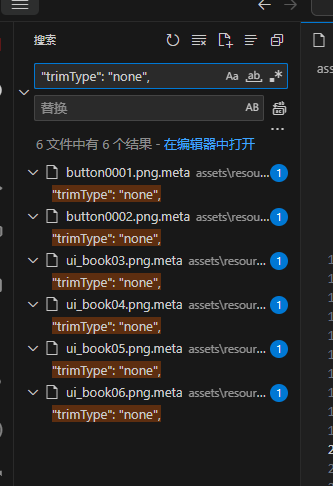
2.x可以用vscode批量替换,3.x不知道行不行。注意要用vscode把需要更改图片所在的文件夹打开,别在整个项目文件夹上改,那样就是把所有图片的设置改了
1赞
在哪里用就在哪里修改(Sprite组件的Trim属性),而不是改导入的文件。
例:入户水管是自来水,要泡茶的时候烧开水,而不是在入户水管上装个热得快。
https://docs.cocos.com/creator/manual/zh/ui-system/components/engine/trim.html
我的情况是这样子的,我们有一个平台,用于发布后给用户做资源替换。美术在做的时候,会给图片留一些空白好让用户有更大的空间去做图片替换。
所以我们需要对所有SpriteFrame在导入的时候,就做trimType:none的设置,目前因为没有好的办法,都是手动设置。
美术是对齐了的, 但是对齐的是实质部分, 虚化部分是没有对齐的
举个例子
------                 ^
|    |               /    \
------              --------
   .......             ........
                          ....
这两个画面, 上方形状是实体, 下发虚线是光晕
实体对齐了切图给我, 一 trim 就歪了
看了一下比较困难, 除了改 trimType, 连带预计算了挺多参数的, 不能只改 trimType
哈哈哈, 给你的比喻点赞
不过一天要烧一吨热水的时候, 就希望能装个热得快了, 一泡一泡烧太费事儿了
我不是想让大家都这样啦, 就是希望还有这个功能, 毕竟这个功能不难而且曾经已经实现过了
引擎能有这个选项, 就有更多可玩性了, 保不齐有人想拿透明像素区域做有趣的玩法
我一下想不出来, 但可能有其他小伙子就能想出来这种玩法, 这个时候如果编辑器支持默认 trimType = none, 那能帮到那个小伙纸很多
导入到同一个文件夹,然后在vscode里面搜索文件夹"trimType": "auto"替换成"trimType": "none" 这样可以不?
我拿 git 对比过, ccc 上修改
"trimType": "auto",
   ->   "trimType": "none",
的话, meta 文件里对应自动修改了很多参数
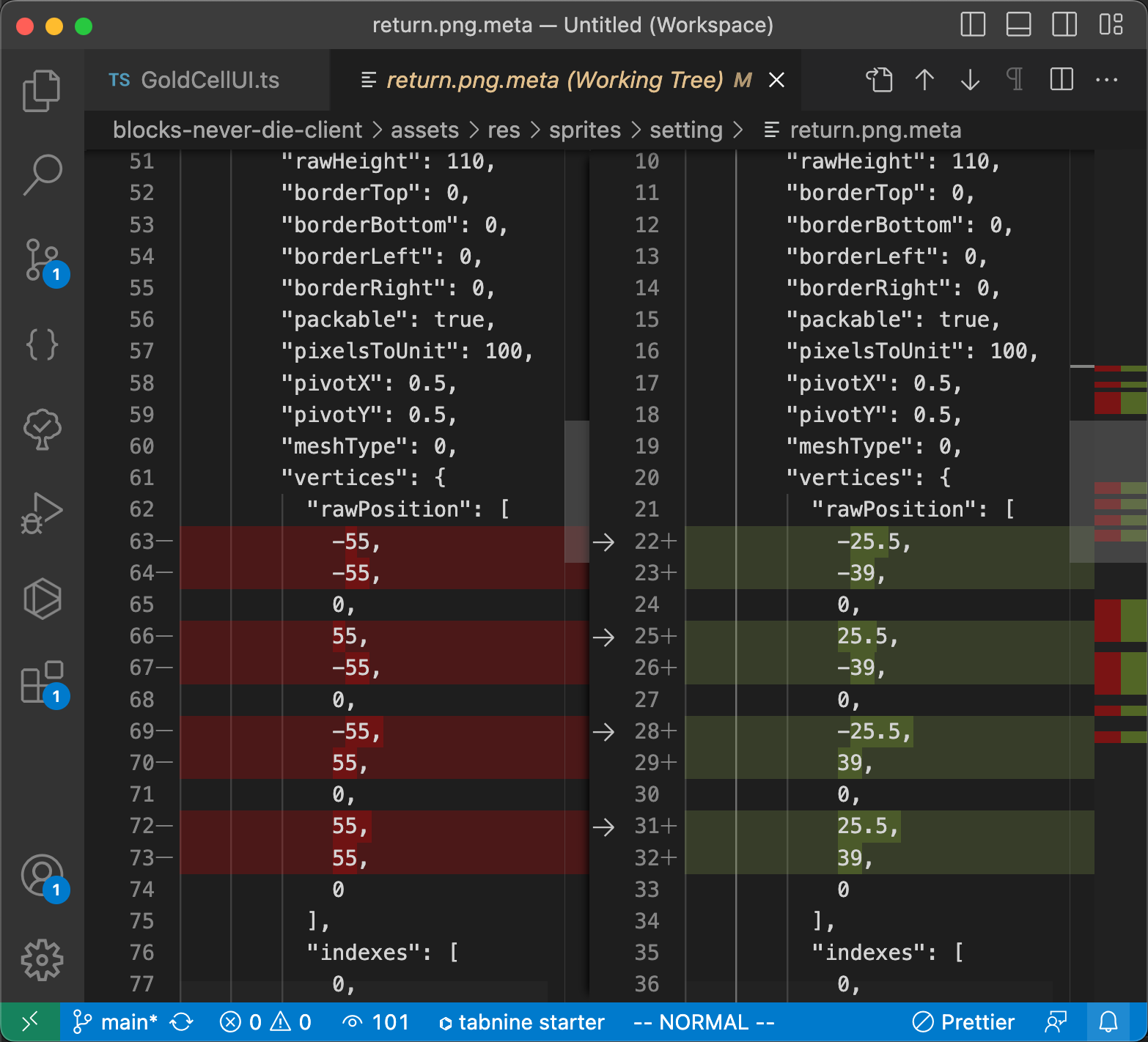
所以想要完美批量替换, 可能还需要补充计算新的 trimX/Y, offsetX/Y 等参数
你这个需求请参考我 9 楼的回复
我鼓捣了一下, 发现手动设置也不费事儿了现在, 因为 CCC 支持批量操作属性
- Assets Panel 全选图片
- Inspector Panel 修改 trimType
被选的资源就都更新好了
不麻烦的话, 每个文件夹操作一次
文件夹多的话, 右键黄色 assets, search in folder, 搜所有的 png jpg 来全选